The Data Already Exists. The Report Does Not.
Imagine an ordinary working day.
The sales team has already recorded its orders. Invoices exist. Inventory is tracked. Expenses are entered. Payments are arriving.
A business leader asks: how much did we sell, what did we actually earn, what are customers still expected to pay, what stock do we have, and how does this compare with last month?
The answer is often: "We will prepare the report."
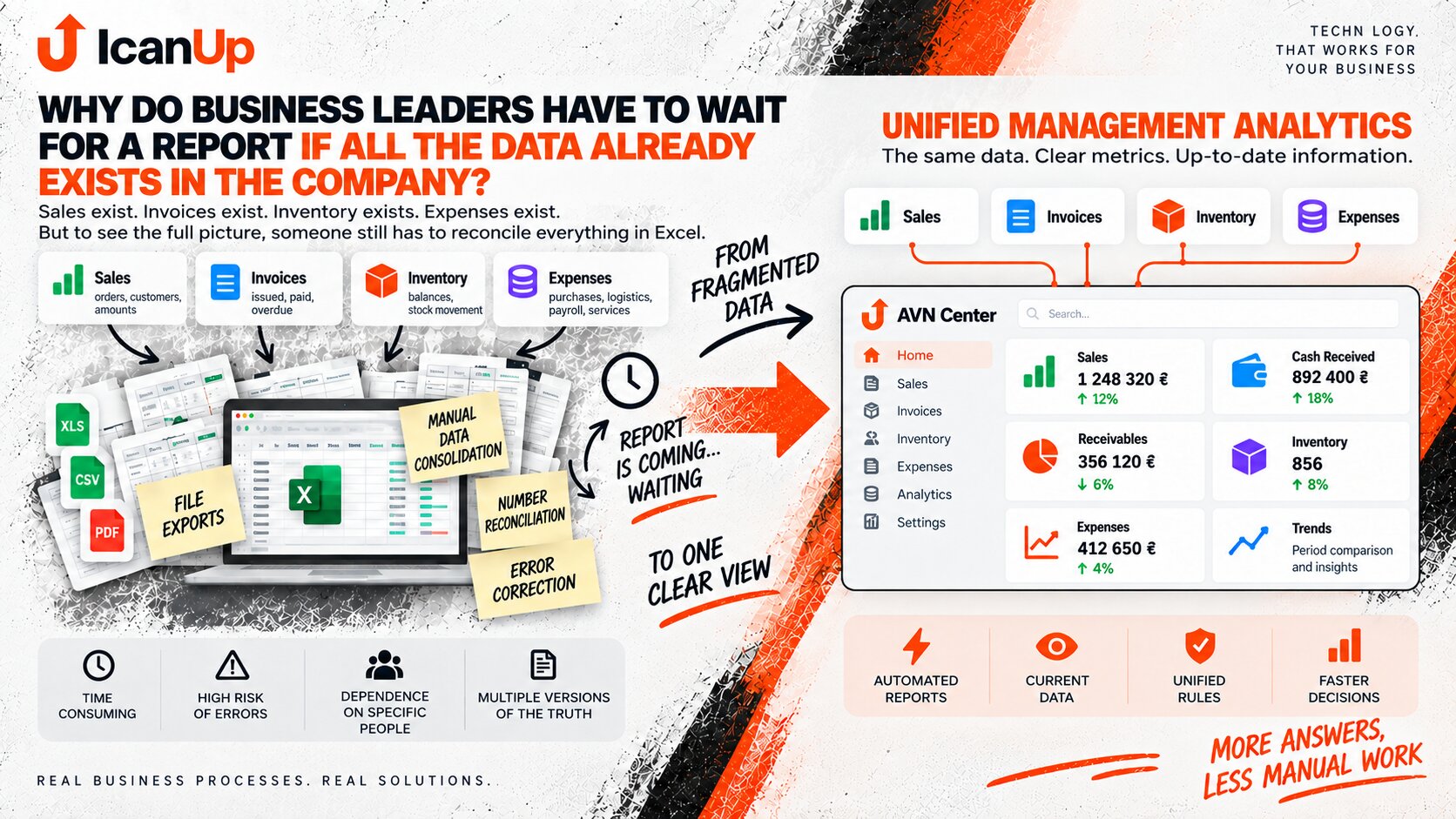
Someone opens several systems, exports files, copies data into Excel, checks formulas, reconciles numbers, and only then produces the management view.
The Data Exists, but It Lives Across the Business
Each individual process may work perfectly well. The difficulty appears when management needs to see them together.
Sales and Orders
What was sold, to whom, when, in what quantity, and at what price.
Invoices and Payments
What has been invoiced, what has been paid, what is outstanding, and where payment is overdue.
Inventory
What is physically available, what is reserved, what sells quickly, and which products may soon need replenishment.
Expenses
Purchasing, logistics, services, payroll, and other costs may be recorded in a completely different place.
Why the Report Still Has to Be Built Manually
Raw business data: sales in one spreadsheet, payments elsewhere, inventory in another tool, and expenses in another source.
Each source answers its own question, but none provides the complete management picture.
Management information: the same data is connected by consistent rules so sales, payments, outstanding amounts, inventory, expenses, and trends can be understood in one context.
Four Reasons Existing Data Is Not Yet a Report
Simply storing information does not mean the business can immediately use it for management decisions.
Different Sources
Sales, payments, inventory, and expenses may use different structures, identifiers, and update rules.
Different Definitions
Sales, revenue, payment, and profit are not the same metric. Without agreed definitions, two technically correct reports can show different answers.
Different Update Times
One source may be current, another may be a day behind, and a warehouse transaction may still be waiting to be entered.
Manual Adjustments
If someone has to clean, correct, or enrich data before every report, report preparation becomes its own business process.
Management Needs Answers, Not Files
What Business Leaders Usually Want to See Without Waiting
A company does not necessarily need a huge set of metrics first. Often management needs a small number of clear answers.
Sales and Trends
What was sold today, this week, or this month, how performance changed, and which products or areas created the result.
Payments and Receivables
How much money has arrived, how much is still outstanding, and which invoices need attention.
Inventory and Movement
What is available, what moves slowly, what sells quickly, and which stock may soon run out.
Comparison
Not just a number, but context: better or worse than the previous period, the target, or another part of the business.
A good management report does not necessarily collect more data. It turns existing data into a useful answer faster.
An Automated Dashboard Does Not Solve the Problem by Itself
It may seem obvious to connect a dashboard to every source and immediately display charts. But automating an incorrect or ambiguous calculation only produces the wrong answer faster.
The reporting rules need to be clear first.
When does a sale count: order creation, shipment, or payment? How are returns treated? Should inventory show physical or available stock? Which period should an expense belong to?
Those decisions are what turn stored data into a management model.
How to Move From Manual Reporting to Useful Analytics
I would start with the management question, not with dashboard colors.
Define the Question
For example: monthly sales, cash actually received, outstanding invoices, or products that need replenishment.
Identify the Data Sources
Determine where every required number originates and which source should be authoritative.
Agree on the Rules
Define metrics, reporting periods, statuses, returns, adjustments, and other business conditions.
Connect the Data
Customers, orders, invoices, payments, products, and expenses need clear relationships.
Automate the Calculation
Only then can the system reliably calculate the required indicators without rebuilding them manually each time.
When Excel Has Become Part of the Reporting System
Familiar Signs of Manual Analytics
Excel itself is not the problem. The useful question is how much work happens before a number reaches the final spreadsheet.
Repeated Exports
Every morning, week, or month someone downloads the same types of files from the same systems.
Copy and Paste Between Files
Data is manually moved into one reporting workbook even though the underlying sources rarely change.
One Person Understands the Report
The formulas, filters, exceptions, and preparation process are understood mainly by the person who built the workbook.
Decisions Use Yesterday’s Picture
The report may be correct, but part of the business situation may already have changed by the time it is delivered.
Practical Questions About Management Reporting
Automation makes sense not because Excel is inherently wrong, but when report preparation starts affecting the speed, consistency, or quality of decisions.
Does a manual Excel report need to be replaced immediately?
Where should reporting automation start?
Does all company data need to move into one database immediately?
Does every metric need real-time data?
How Long Does It Take Your Team to Prepare a Management Report?
If your team already has the data but still spends hours exporting, reconciling, and rebuilding reports, I would be interested in understanding the workflow and which answers management actually needs.