One Order Should Not Turn Into Six Manual Data Entries
In many businesses, repetitive manual work does not exist because employees are doing something wrong. It grows in the gaps between systems and stages of the workflow.
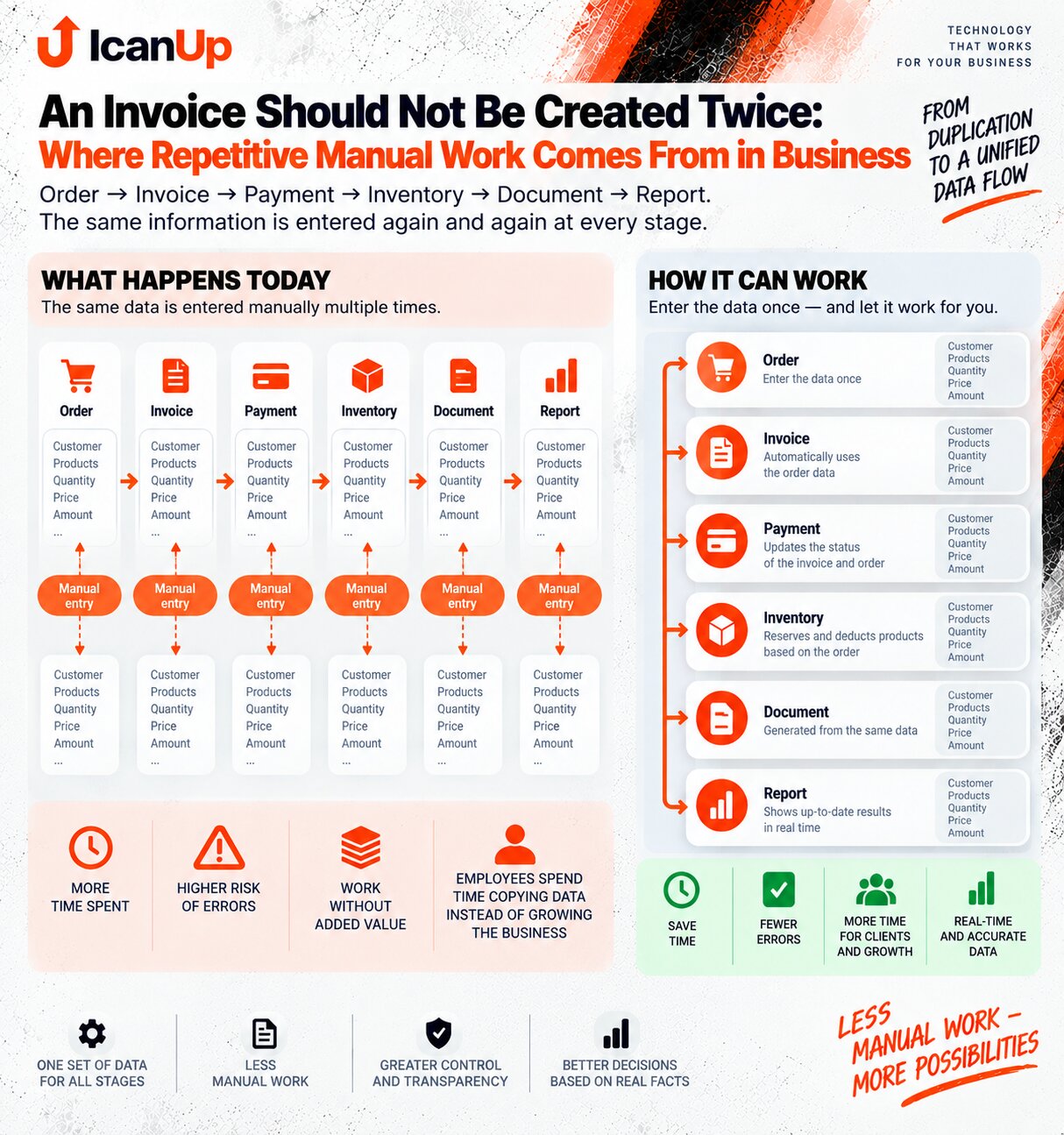
A sales manager creates an order. Someone then copies the same information into an invoice. A payment changes status somewhere else. Inventory receives the product details separately. Later, the same data appears again in documents and management reports.
At every stage, the information already exists. But instead of moving with the business process, it is copied again by a person.
How One Transaction Turns Into Repeated Manual Work
Take a simple sale. The underlying information changes very little, but it passes through several operational stages.
Order
The customer, products, quantities, prices, discounts, and terms are already recorded.
Invoice
The same information is often copied into another document even though most of the fields are already known.
Payment
When money arrives, someone has to find the invoice and update a status or record the payment elsewhere.
Inventory
The business needs to know what to reserve, what to ship, and how the available balance should change.
Document
The same customer and order information is used again to create another business document.
Report
Finally, the data is collected again to show the sale, payment, inventory movement, and business result.
Where Duplicate Entry Usually Appears
Repetitive work can be difficult to notice when every individual action only takes a few minutes.
Customer Details
Names, contacts, addresses, tax information, and other details are repeated across orders, invoices, and documents.
Products, Quantities, and Prices
The items already exist in the order but are copied again into invoices, inventory documents, or files for another team.
Payment Status
The bank or payment provider may already know that money arrived, while someone still updates the invoice or spreadsheet manually.
Reporting Data
The same transactions are exported and reconciled again to calculate sales, receivables, inventory movement, or revenue.
What Should Happen Instead of Re-entering Data
Manual chain: create the order, copy it into an invoice, record the payment separately, notify inventory manually, create another document, and rebuild the information again for reporting.
Each stage may be correct, but a person constantly moves data between them.
Connected workflow: the order is already the source of the customer, products, quantities, and prices. The invoice reuses that information, payment updates the transaction, inventory receives the required movement, and reporting uses the same business event.
People control exceptions and decisions instead of copying identical fields.
One Business Event Can Prepare Several Next Actions
Not every action has to be completely automatic. But the system can already provide the correct context and data.
Order Confirmed
The system can prepare an invoice using the existing customer details and line items without retyping them.
Stock Reserved
Inventory immediately knows which quantity should no longer be available for other orders.
Payment Received
The invoice and order status can update without someone manually finding the record and entering the same amount again.
Goods Shipped
The inventory movement remains connected to the transaction and can immediately affect balances and reporting.
Good automation does not remove people from the process. It removes the repetitive work that does not require a new decision every time.
Where Human Control Still Matters
Automate Repetition, Not Responsibility
Real businesses always have exceptions, unusual terms, and decisions that should not disappear behind full automation.
Review Before Sending
An invoice or document can be prepared automatically while the responsible employee still reviews it before it is sent.
Special Terms
A special price, discount, delayed payment, partial payment, or another agreement may still require a deliberate decision.
Approval for Important Actions
Returns, write-offs, large amount changes, or other sensitive actions may require approval.
Correcting Mistakes
Corrections should remain possible, ideally with a reason, responsible person, and visible history.
How to Find Repetitive Manual Work in Your Workflow
Start With Repetition, Not With Software
Take one real transaction from beginning to end and look for every place where the same information is entered again.
Choose One Real Order
Do not describe the process only in theory. Follow one actual order through the company.
List Every Data Entry Point
Find where customer details, products, quantities, prices, addresses, amounts, and payment statuses are entered.
Mark Repeated Values
When the same value is entered again, ask why the previous stage cannot pass it forward.
Separate Decisions From Copying
Changing a price may be a business decision. Retyping an unchanged customer address is only repetitive work.
Automate the Most Stable Connection First
The entire company does not need to be redesigned at once. One reliable connection between two stages can already remove many repeated actions.
Practical Questions About Duplicate Data Entry
Not every repeated action needs automation. But systematic copying of the same fields is usually worth examining.
What if the invoice needs to be edited after the order?
Should a payment automatically close an invoice?
Can Excel remain part of the workflow?
Which repeated task should be automated first?
Where Does Your Business Enter the Same Data More Than Once?
If customer, order, invoice, payment, inventory, or reporting data is still being copied between tools, I would be interested in understanding which repeated step takes the most time and where a custom workflow could remove that friction.