After I kept private S3 files private during local development, the next practical question was how an authorized user should actually receive such a file.
Making the object permanently public just for reading is unnecessary.
Laravel can generate a short-lived signed URL for one specific private object.
The object itself does not become permanently public.
A Private File Does Not Need a Permanent Public URL
Private file | vmake public | vpermanent URL | vanyone who knows itcan request the object Convenient,but the access modelis now wrong.If a file is private by system rules, I do not want to make it public merely because an authorized user needs to open it once.
I prefer keeping the object private and granting controlled access only for the required period.
Laravel Provides temporaryUrl() for This
$url = Storage::disk('s3') ->temporaryUrl( $path, now()->addMinutes(10), );temporaryUrl() receives the object path and an expiration time.
Through the S3 driver, Laravel creates a signed request that storage can validate without changing the privacy of the object itself.
After the expiration time, that same URL should no longer grant access.
This Does Not Require a Separate MinIO Service
I generate the temporary URL through the same Laravel's standard S3 disk that stores the private object.
The application does not need a separate MinioTemporaryUrlService merely because MinIO is the local S3-compatible storage provider.
The important contract remains S3 rather than the provider name.
Authorization Must Happen Before the URL Is Generated
$this->authorize( 'view', $document,); $url = Storage::disk('s3') ->temporaryUrl( $document->storage_path, now()->addMinutes(10), ); return [ 'url' => $url,];temporaryUrl() does not know who the user is or whether that user is allowed to see the file.
That is an application responsibility.
The order therefore matters: resolve the resource, authorize access, and only then create the temporary URL.
The URL Itself Becomes a Temporary Access Credential
User | | authenticated request vApplication | | authorization vtemporary signed URL | vBrowser | | direct request vS3-compatible storageAfter such a URL is generated, the next request can go directly to the S3-compatible storage service.
The storage service validates the signature and expiration rather than the Laravel session.
The URL itself should therefore be treated as a short-lived credential.
If a user shares it with someone else, that person may also use it while the URL remains valid.
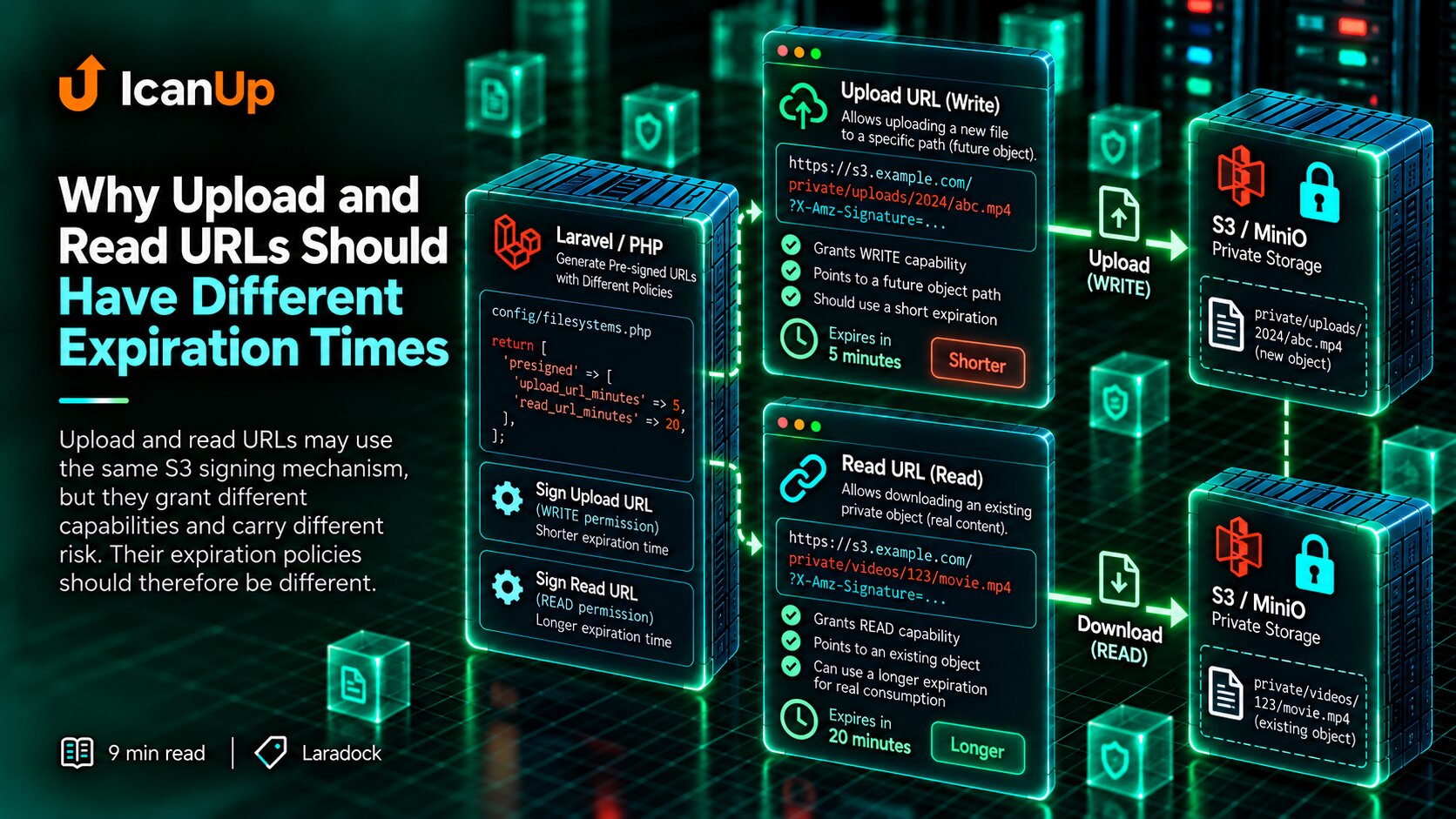
Expiration Should Match the Actual Use Case
now()->addMinutes(5) now()->addMinutes(10) now()->addMinutes(30)I do not choose a long lifetime merely to make sure the user has enough time.
The URL should live long enough for the normal read or download flow, but not significantly longer.
Different file types may reasonably use different lifetimes.
I Store the Object Path, Not the Temporary URL
Database storage_path =private/documents/example.pdf At request time storage_path | vauthorization | vtemporary URL |A temporary URL expires, so storing it as a long-lived database field makes little sense.
I store the stable object key or path instead.
When access is requested, the application authorizes the user again and generates a fresh URL.
A Temporary URL Should Not Quietly Become a Permanent API Contract
If an API returns a signed URL, a client may be tempted to cache it indefinitely and expect it to keep working.
That assumption is wrong.
A temporary URL is the result of one access request, not the permanent identity of the file.
Short Expiration Does Not Replace Authorization
A five-minute URL still must not be issued to a user who is not allowed to access the file.
A short lifetime reduces the access window but does not solve authorization.
I therefore separate two questions: who may receive the URL and how long that URL should remain valid.
If the Object Is Deleted, an Old URL Cannot Restore It
The signature authorizes a specific request under defined conditions.
It does not create a copy of the object itself.
If the object has already been deleted from storage, an old signed URL cannot bring it back.
Locally I Also Check Whether the Browser Can Reach the Generated URL
Laravel container http://minio:9000 | vMinIO Browser cannot normally resolvethe Docker service name"minio"This matters especially with local MinIO.
Laravel inside Docker may reach http://minio:9000 perfectly, while the browser on the host machine does not necessarily know the internal service name minio.
Successfully generating a signed URL is therefore not the complete test.
I open the generated URL from the same environment where the browser will actually use it.
What I Verify for temporaryUrl()
1. File is private -> direct permanent access denied 2. Authorized user requests file -> temporary URL returned 3. URL works before expiration -> file available 4. URL expires -> old URL no longer works The Worst Shortcut Is Making the File Public Instead of Fixing temporaryUrl()
Storage::disk('s3')->put( $path, $contents, 'public',);If a locally generated signed URL does not open because its host is wrong, it is tempting to solve the problem the wrong way by simply making the object public.
I do not do that.
The temporary-URL generation or browser-access problem should be fixed without changing the privacy model of the file.
My Temporary URL Checklist
I verify:
- Does the object remain private?
- Is the user authorized before
temporaryUrl()is called? - Does the expiration match the actual use case?
- Does the database store the object path rather than the temporary URL?
- Does the client avoid treating the temporary URL as a permanent file address?
- Can the browser reach the generated URL?
- Does direct anonymous access without a signature remain denied?
- Does the expired URL stop working?
A Private File Can Be Accessible Without Becoming Public
temporaryUrl() fits naturally into a private S3 storage model.
The object remains private. The application decides who may access it. Only then is a short-lived signed URL generated for that specific object.
The database keeps the stable object path rather than a URL that will soon expire.
This avoids giving a private file a permanent public URL merely so a browser can open it.
Privacy determines who may receive access. A temporary URL determines how that already-authorized access reaches the browser for a limited period.
I do not make a private file permanently public. I grant access only when it is needed, to a user who is allowed to receive it, and only for a limited time.