In the previous article I covered temporary URLs for private files for reading a private object.
An upload can follow a very similar model, only the data travels in the opposite direction.
Laravel authorizes the operation, chooses the future object path, and generates short-lived upload permission.
The browser then sends the large file directly to S3-compatible storage.
A Traditional Upload Sends the Entire File Through PHP
Browser | | large file vNginx | vPHP | | temporary upload | request handling | storage write vS3-compatible storageFor a small file this can be perfectly reasonable.
With a large video, however, PHP becomes a proxy for a large data stream even though application code usually does not need to inspect every byte.
The request occupies a worker longer and passes through HTTP body limits, execution-time limits, and temporary server-side upload handling.
With Direct Uploads PHP Transfers Permission, Not the File
1. Browser -> Laravel file metadata 2. Laravel authorize choose object path create short-lived upload permission 3. Browser -> S3-compatible storage large fileLaravel Can Generate a Temporary Upload URL
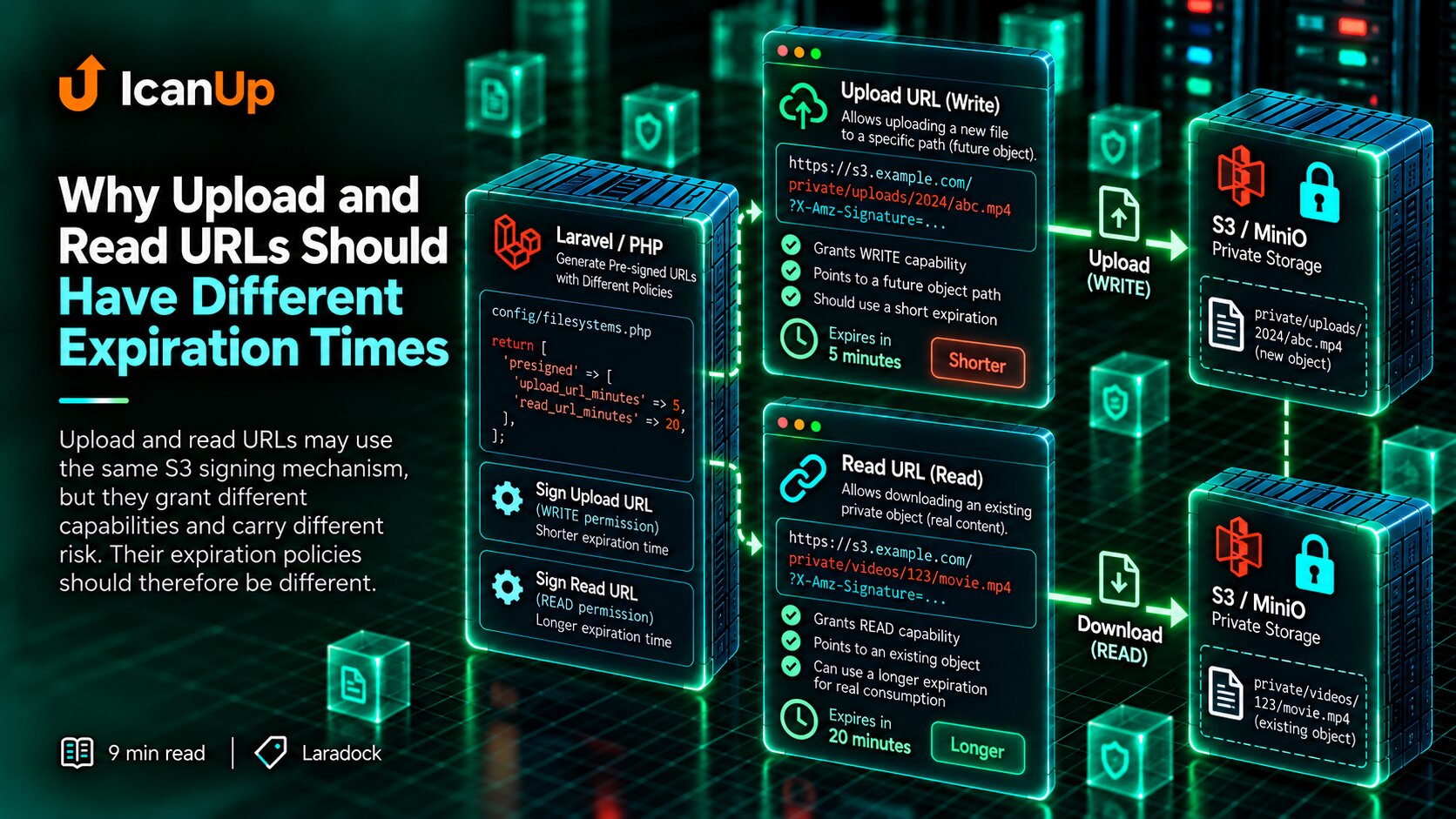
[ 'url' => $url, 'headers' => $headers,] = Storage::disk('s3') ->temporaryUploadUrl( $path, now()->addMinutes(5), );temporaryUploadUrl() returns the upload URL and headers the client should include with the request.
This is not permanent write access to the bucket.
The URL targets a specific object path and has a limited lifetime.
The Application Chooses the Object Key, Not the Browser
$path = sprintf( 'private/videos/%s.mp4', (string) Str::uuid(),);I do not let the client arbitrarily choose any S3 object key.
The application decides which storage area may be written to and generates a safe object name.
This prevents the client from overwriting another object or choosing a path outside the intended area.
I Authorize Before Issuing Upload Permission
$this->authorize( 'uploadVideo', $resource,); $path = $pathFactory->forVideo( $resource,); [ 'url' => $url, 'headers' => $headers,] = Storage::disk('s3') ->temporaryUploadUrl( $path, now()->addMinutes(5),Being authenticated does not mean a user may upload a file in every context.
The application authorizes the specific operation before creating signed upload permission.
Once the URL is issued, storage does not ask Laravel about the user role. It validates the signature.
I Validate the Intended Upload Before Issuing Permission
$data = $request->validate([ 'name' => [ 'required', 'string', 'max:255', ], 'size' => [ 'required', 'integer', 'min:1', 'max:524288000', ], 'type' => [ 'required',The server does not have the actual file yet, but the client can send its name, declared size, and content type.
Those values help reject clearly invalid upload attempts before issuing a signed URL.
Browser-supplied metadata is not final proof, however. The stored object should be verified after upload.
The Browser Then Uploads Directly to Storage
const response = await fetch( upload.url, { method: 'PUT', headers: upload.headers, body: file, },) if (!response.ok) { throw new Error( 'Upload failed', )}In this request the large video body travels directly from the browser to S3-compatible storage.
A PHP worker no longer waits while hundreds of megabytes pass through the application.
Laravel was needed to decide whether the upload was allowed and where it should go, not to relay the bytes themselves.
Direct Upload Does Not Mean the Object Must Be Public
I keep the private S3 storage model.
Temporary permission to write one object does not mean that object should receive a permanent public URL afterward.
The uploaded object can remain private, with separate short-lived access generated when it needs to be read.
Upload Permission Should Be Narrow, Not Bucket-Wide
Allowed: PUTprivate/videos/7fd2...mp4 Not granted: list bucketdelete another fileread another filewrite arbitrary pathpermanent credentialsDirect Browser Upload Requires Correct CORS and a Reachable Storage URL
Laravel container: http://minio:9000 | vworks Browser: http://minio:9000 | XDocker service name may not resolveWith direct upload, the browser calls the storage HTTP endpoint directly, so CORS becomes part of the working flow.
I allow only the required origins, methods, and headers.
I also verify the generated host: Laravel inside Docker may reach minio:9000, while the user browser does not live inside that Docker network.
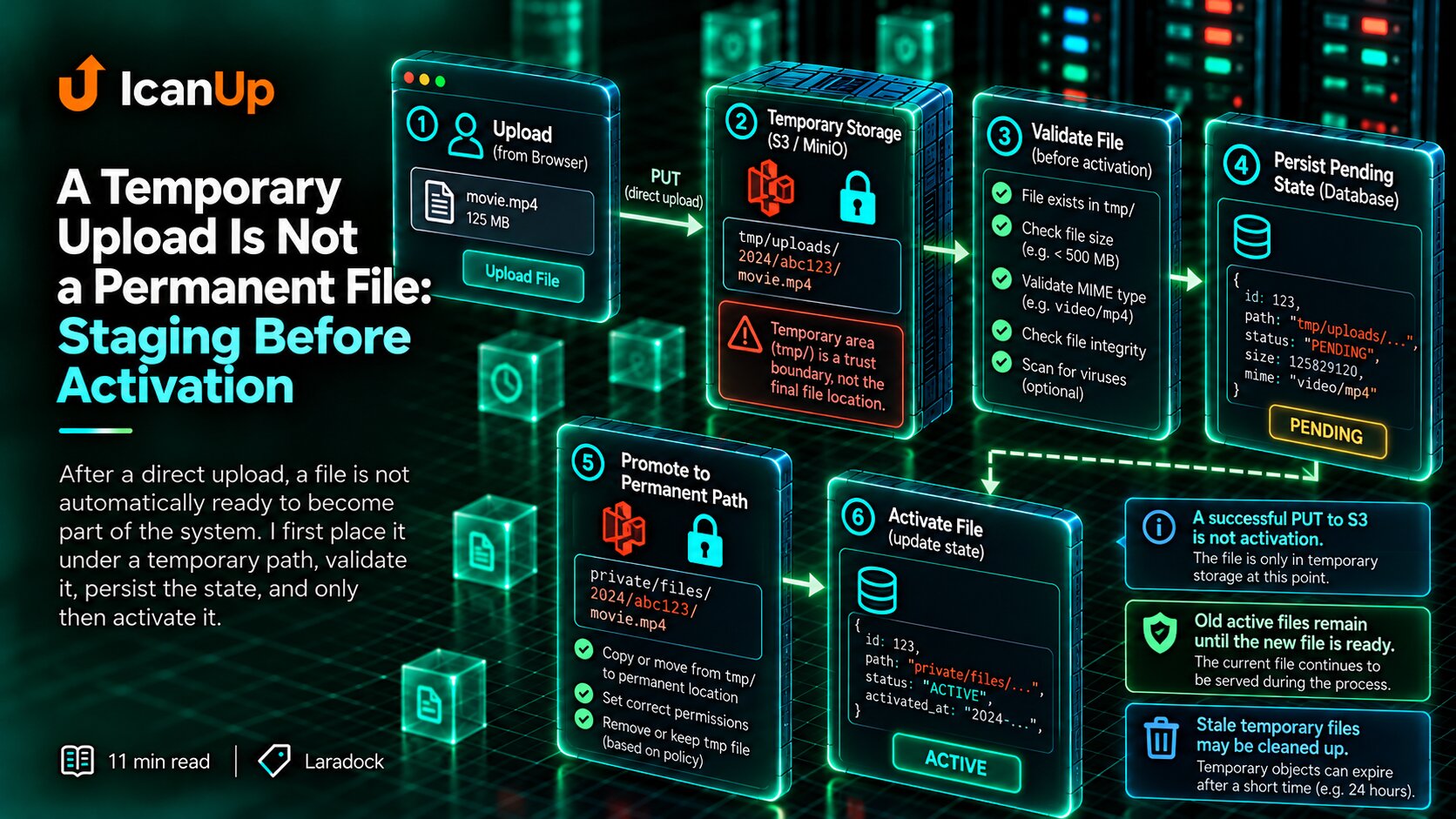
A Successful PUT Does Not Complete the Application Operation
Browser | | PUT succeeds vS3 then Browser | | upload completed vLaravel |Storage may accept the file successfully, but the application still needs to learn that the operation completed.
I do not persist a final ready-file state merely when the URL is issued because the user may never perform the upload.
After a successful PUT, the client notifies the application and the server verifies the object.
After Upload I Verify the Actual Stored Object
$disk = Storage::disk('s3'); if (! $disk->exists($path)) { throw ValidationException::withMessages([ 'file' => 'Uploaded object was not found.', ]);} $size = $disk->size( $path,); $mimeType = $disk->mimeType( $path,);Before issuing the URL, I only had metadata declared by the client.
After upload I can verify that the object exists, inspect its actual size, and read the stored MIME type.
Only after that verification do I move the application record into a ready-file state.
There Is a Pending State Between Permission and Completion
requested | vupload permission issued | vpending upload | +---- abandoned | vobject uploaded | vserver verification |A user may receive permission, close the tab, lose the network, or abort the upload.
The intermediate application record should not remain indefinitely as though a ready file exists.
These states need an expiration or cleanup strategy.
If storage contains objects that were never finalized by the application, there should also be a safe way to remove them.
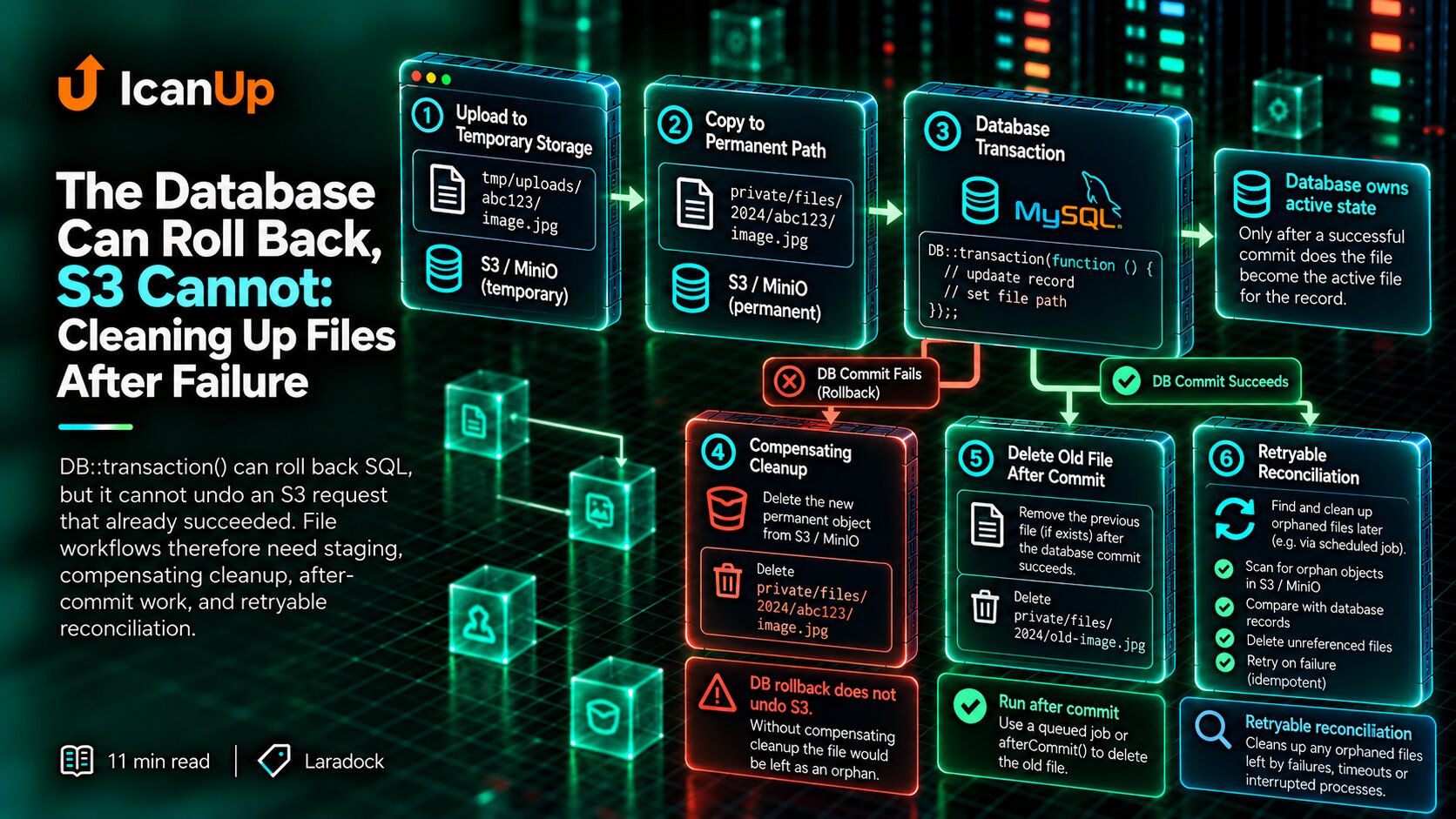
When Replacing a File I Remove the Old Object Only After Success
Old file | | keep v New direct upload | vverify new object | vupdate application state | vremove old objectIf an existing file is being replaced, I do not delete the old object when the new upload URL is issued.
The new upload may never complete.
I verify the replacement first, update application state successfully, and only then clean up the previous object.
Direct Upload Does Not Remove Laravel Responsibility
Laravel still owns: - authentication- authorization- allowed file purpose- object path- declared limits- short permission lifetime- final verification- database state- replacement and cleanup rules Storage owns: - receiving file bytesNot Every File Needs a Direct Upload
I do not use direct upload merely because it is technically possible.
For small avatars or simple attachments, a normal PHP upload may remain much simpler.
The direct flow becomes especially useful for large files, long uploads, or situations where PHP should not remain between the browser and storage throughout the data transfer.
What I Verify for a Direct S3 Upload
My short checklist:
- Is this upload operation authorized for the user?
- Does the server generate the object path?
- Are declared size and type checked before permission is issued?
- Does
temporaryUploadUrl()have a short lifetime? - Does the browser send all required signed headers?
- Does CORS allow only the required flow?
- Is the storage URL reachable by the browser, not only the Docker container?
- Does the file remain private after upload?
- Does the application verify the real stored object afterward?
- Can abandoned uploads be cleaned up?
- Is the old file kept until replacement succeeds?
PHP Should Control the Operation, Not Relay Every Byte
For large files I like separating control from data transfer.
Laravel authenticates the user, authorizes the operation, chooses the object path, validates declared metadata, and issues short-lived permission.
The browser then transfers the large file directly to S3-compatible storage.
After the upload completes, Laravel becomes involved again to verify the real object and persist the final state.
PHP remains the owner of application rules without becoming the transport for hundreds of megabytes of data.
Direct upload does not bypass the application. It only removes the application from the part of the path where it does not need to sit between the browser and storage.
Laravel decides whether an upload is allowed and where it belongs. The browser can send the large file directly to storage.