Inventory Should Not Have to Stop Operations
Traditional inventory often starts with a simple idea: take the recorded stock list and verify how much is physically present.
The difficulty begins when that list is no longer static. While one employee counts an item, another may sell it. A new delivery may arrive. Stock may be moved to another location or consumed in production.
For me, the important question is therefore not simply how to count every item faster, but how to organize the count so that it remains reliable while normal work continues.
Why a Simple Count Quickly Becomes More Complex
Inventory is not only about quantities. It also involves time, stock movements, responsibility, and explaining why the recorded and physical numbers differ.
Operations Continue
While one item is being counted, it may be sold, transferred, received, or consumed.
A Quantity Belongs to a Moment in Time
A count without its timestamp can quickly lose meaning when new stock movements happen afterward.
A Discrepancy Needs an Explanation
The difference between recorded and physical stock should become a clear decision, not simply a replacement number.
Responsibility Matters
The system should show who counted, who reviewed the result, and who approved the stock correction.
What This Inventory Process Could Look Like
The employee experience can remain simple even when the system tracks significantly more context internally.
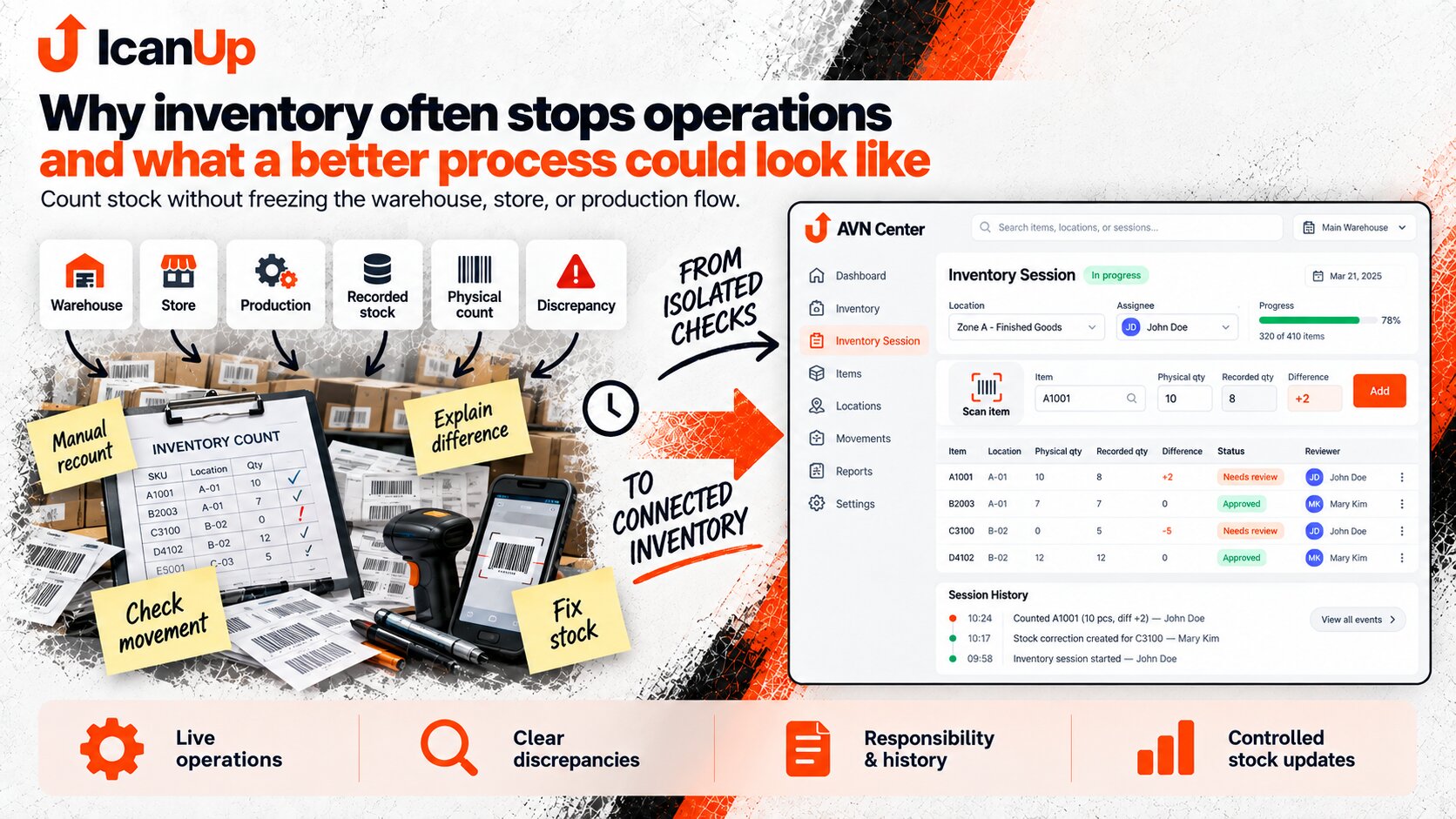
Open an Inventory Session
Choose a warehouse, zone, product group, or another understandable scope that needs to be checked.
Find the Product by Phone or Scanner
The employee scans a code or finds the item in the system instead of working from a paper list.
Enter the Physical Quantity
The system stores not only the number but also the counting time, location, and employee.
See the Discrepancy
Recorded and physical quantities are compared, but the stock value is not immediately overwritten.
Account for Movements During the Count
Sales, receipts, transfers, and other operations after the counting moment remain separate events.
Explain and Approve the Difference
A reason can be recorded and the discrepancy can be sent to the responsible person when approval is required.
Update Stock in a Controlled Way
After approval, the system creates a correction, updates the stock balance, and preserves the complete history.
The employee should not need to work with a complicated accounting document. The important information is what the system expected, what was physically found, and whether the difference requires another action.
| Item | Recorded | Physical | Difference | Status |
|---|---|---|---|---|
| Material A | 120 | 118 | -2 | Needs review |
| Product B | 24 | 24 | 0 | Confirmed |
| Product C | 8 | 11 | +3 | Explanation required |
Another important part of this process is that history should not disappear when the balance is updated.
If the system simply replaces 120 with 118, it may be difficult a month later to explain where the new number came from. It is much more useful to preserve the original balance, physical count, discrepancy, reason, employee, approval, and resulting correction.
Inventory then becomes part of controlled stock management instead of a periodic exercise in replacing numbers.
Practical Questions
These situations determine whether an inventory process remains useful during everyday operations.
Does the warehouse or store need to close completely?
What happens if an item is sold after it was counted?
Can several employees count at the same time?
Should a discrepancy update stock immediately?
What should remain in the history?
From Real Business Needs to a Connected System
Inventory is only one process where an isolated spreadsheet or small automation quickly meets the rest of the business. This series explores these situations and how they shape the approach behind AVN Center.

Automation Should Start With the Real Process
Software becomes useful not when it simply moves a paper list onto a screen, but when it reflects how the business actually operates: movements, responsibility, exceptions, and decision history.