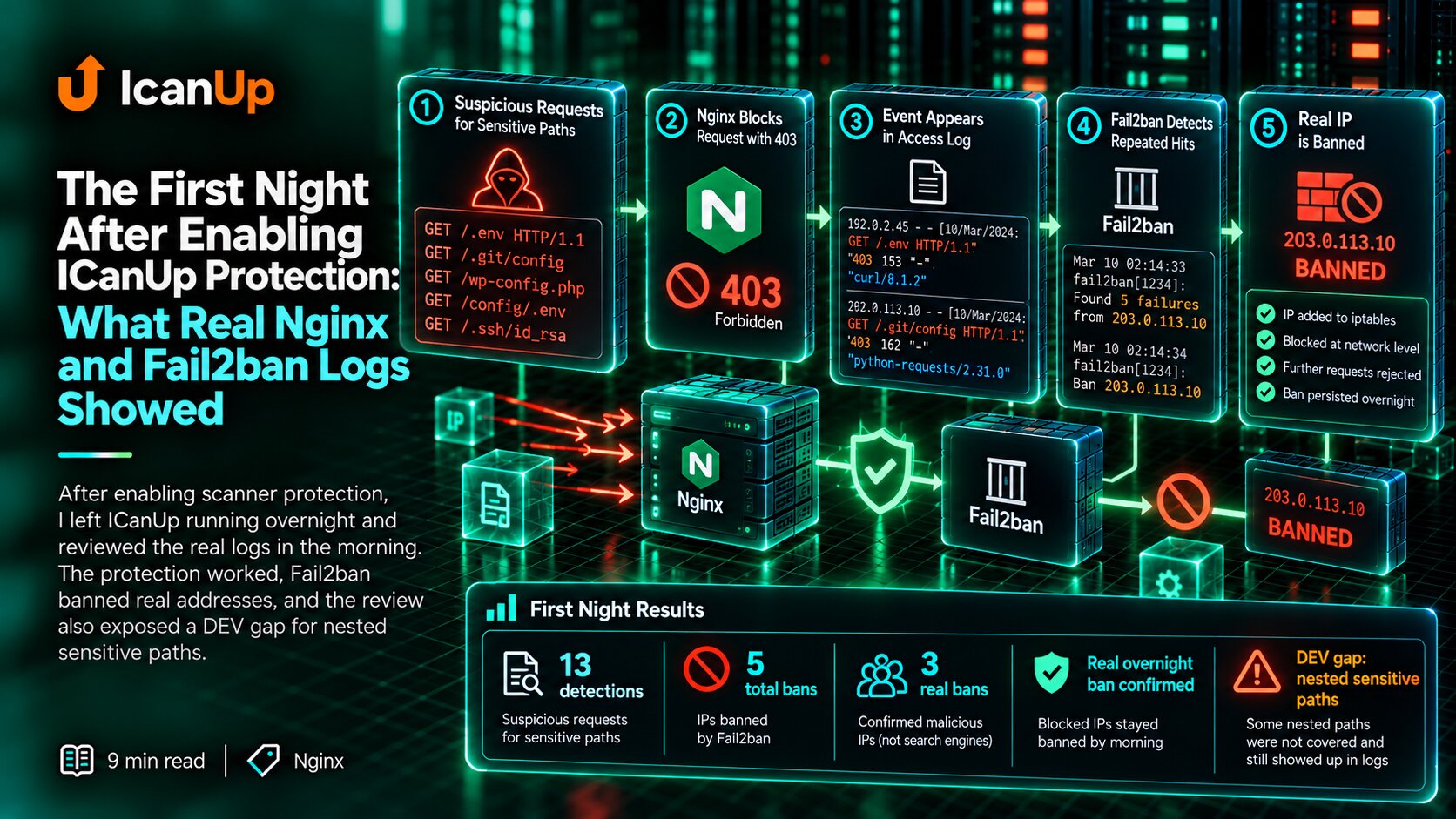
In the previous article I covered the investigation of the suspicious traffic: sudden traffic spikes, repeated IP addresses, sequential page crawling, and probes for /.env, /app/.env, /.git, and wp-config.php.
The investigation also exposed another problem: a dangerous request did not always stop where I expected.
/app/.env was particularly revealing. Because of Nginx location precedence, the request could reach a separate proxy path and end with 500 instead of being rejected early.
I changed the protection boundary after that.
A high-confidence dangerous request should reach neither Laravel nor another internal service.
A Dangerous Request Is Better Stopped Before Laravel
Less desirable: Internet | vNginx | vLaravel / another service | vprocessing | vreject A request for /.env does not need Laravel to boot, middleware to run, a database query, or another internal service to receive it.
If the path clearly belongs to a forbidden set, the web server can terminate the request earlier.
This does not replace application security. It is simply a better boundary for a request that should never enter the application.
Why a Regex Location Alone Was Not Enough
location ^~ /app/ { proxy_pass http://realtime_upstream;} location ~ /\. { deny all;}A general hidden-file rule looked sufficient until a higher-priority prefix location existed alongside it.
location ^~ /app/ changes location selection. Once selected, ordinary regex locations are no longer evaluated.
Because of that, /app/.env could bypass the general hidden-file rule.
I decided not to make sensitive-path protection depend on which application location wins.
How the Protection Flow Works
HTTP request | vNginx | | sensitive path? | +---- no ----> normal processing | yes | v403 | vdedicated security log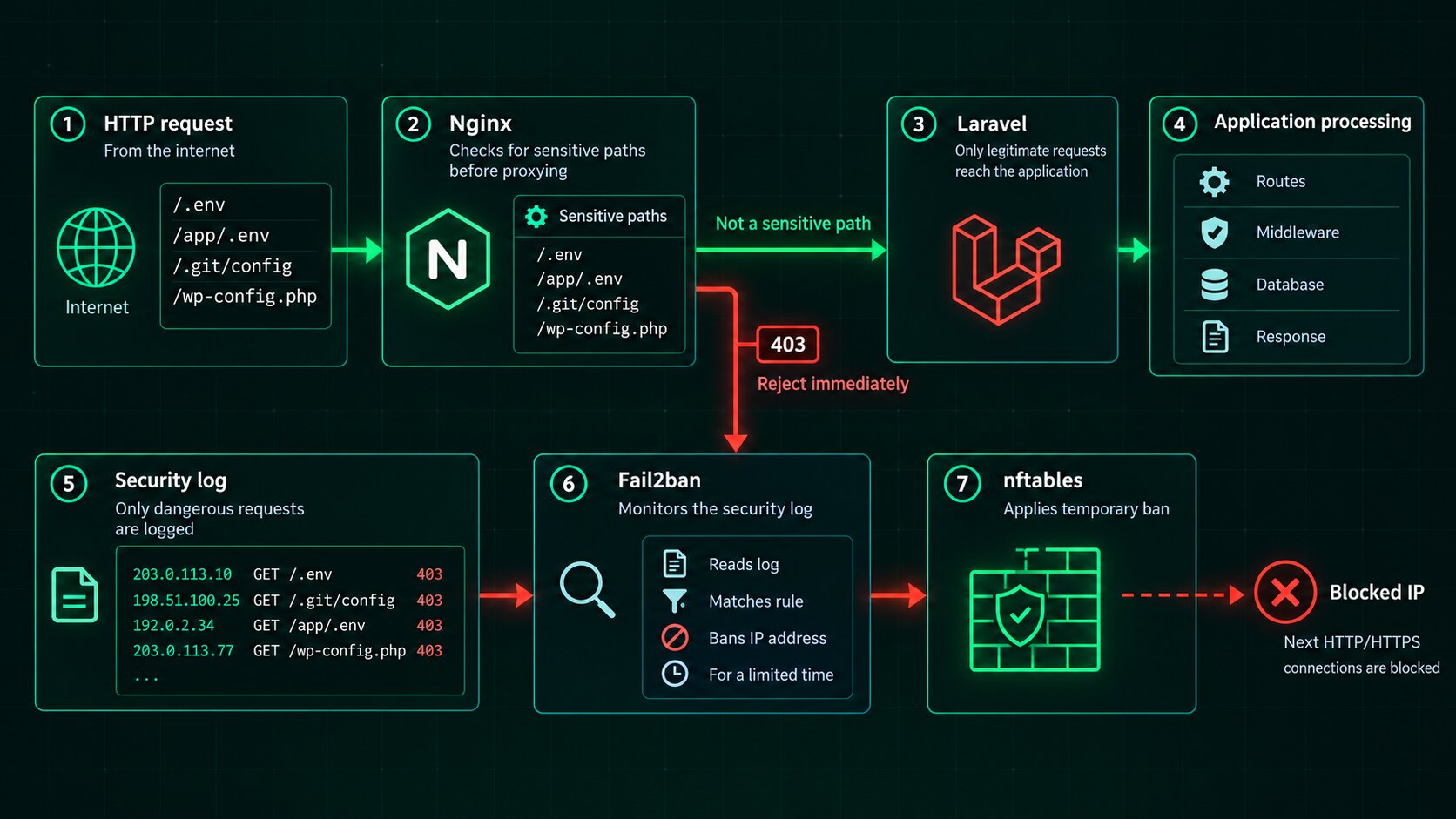
There are two separate responsibilities here.
Nginx decides what to do with the current request and immediately returns 403.
Fail2ban observes the resulting event in the log and decides whether the source should be temporarily blocked from making further requests.
Fail2ban does not replace the Nginx rule. It adds a second layer after the request has already been rejected correctly.
I Detect Sensitive Paths Before Proxying
map $uri $sensitive_path { default 0; ~*^/\.env(?:$|/) 1; ~*^/app/\.env(?:$|/) 1; ~*^/\.git(?:$|/) 1; ~*^/wp-config\.php$ 1;}map $uri provides a dedicated sensitive-path signal independent of an application location.
I intentionally do not encode every suspicious URL that can appear on the internet.
For automatic banning, a short list of high-confidence indicators is safer than an aggressive rule with many false positives.
I Write Dangerous Requests to a Dedicated Security Log
log_format sensitive_path '$remote_addr $time_iso8601 ' '"$request" $status'; server { access_log /var/log/nginx/security-sensitive.log sensitive_path if=$sensitive_path; if ($sensitive_path) { return 403; } # Normal locations continue below.}A dedicated log simplifies the next protection layer.
Fail2ban does not need to inspect every ordinary Nginx access-log entry and distinguish a normal 404 from an .env probe.
The dedicated file contains requests that already matched the narrow sensitive-path rule.
I Validate Nginx Before Applying Changes
sudo nginx -t sudo systemctl reload nginxI do not blindly reload Nginx after editing its configuration.
First, nginx -t must confirm that the configuration is valid.
Only then do I reload Nginx.
I Verify Nginx Before Enabling Automatic Bans
DOMAIN=example.com curl -k -I \ --resolve "$DOMAIN:443:127.0.0.1" \ "https://$DOMAIN/app/.env"Using --resolve, the domain can be directed to 127.0.0.1 without changing DNS.
The expected result for a sensitive path is 403.
I perform this before enabling automatic banning or only when loopback addresses are guaranteed to be ignored by Fail2ban.
Fail2ban Reads Only the High-Confidence Security Log
sudo apt update sudo apt install fail2banI do not ban an address merely because it generated many views, used a mobile browser, or came from a particular country.
For this rule, the event is an already-recognized sensitive-path probe.
The Fail2ban Filter Can Stay Simple
[Definition] failregex = ^<HOST>\s+\S+\s+".*"\s+403$ ignoreregex =The filter does not try to determine whether the URL is dangerous again.
Nginx already made that decision.
Fail2ban reads the dedicated log and extracts the source IP from an event that ended with 403.
One High-Confidence Event Is Enough
[nginx-sensitive-paths] enabled = true filter = nginx-sensitive-paths logpath = /var/log/nginx/security-sensitive.log maxretry = 1 findtime = 600 bantime = 86400 port = http,httpsmaxretry = 1 is deliberate here.
I would not use that threshold for broad heuristics. But an ordinary reader has no reason to request /.env or /.git.
After one such event, the address is banned for 86400 seconds, or 24 hours.
The Ban Applies Only to HTTP and HTTPS
This rule is about web traffic.
The ban is therefore limited to ports 80 and 443.
I do not add SSH to this rule. Administrative-access protection is a separate concern.
Fail2ban Applies the Temporary Ban Through nftables
Nginx | vsecurity log | vFail2ban | vnftables | Xnext HTTP connectionThe first dangerous request reaches Nginx, receives 403, and creates a log event.
Fail2ban then installs a temporary nftables rule.
Subsequent web connections from the banned address no longer reach Nginx.
UFW and nftables Can Serve Different Roles
UFW can remain responsible for persistent server access policy while Fail2ban adds temporary rules through nftables.
I care about verifying the actual result after a ban rather than relying only on one tool name.
I do not change general firewall or SSH policy as part of this task.
I Validate Fail2ban Before Relying on It
sudo fail2ban-client -t sudo fail2ban-client status sudo fail2ban-client status \ nginx-sensitive-pathsfail2ban-client -t is as important to me as nginx -t.
After startup I verify both the overall Fail2ban status and the dedicated sensitive-path jail.
I Verify the Actual Ban in nftables
sudo nft list table inet f2b-tableFail2ban status shows Fail2ban state itself.
I also inspect nftables to confirm that the corresponding network rule actually exists.
I Test Both Dangerous and Normal Paths
Should match: /.env/app/.env/.git/config/wp-config.php Should not match: //posts/example/assets/app.css/app/socketI test more than whether dangerous URLs match.
It is equally important to prove that ordinary application paths do not match the same rule.
In the verification, four dangerous examples matched while four control examples did not produce a false match.
I Use a Reserved Test Address Instead of a Real Visitor IP
192.0.2.123For synthetic verification I use an address from a documentation-reserved range.
This allows ban and unban behavior to be tested without copying a real visitor address into commands or a public article.
I Test the Full Automatic Ban Path Separately
TEST_IP=192.0.2.123 printf '%s %s "%s" %s\n' \ "$TEST_IP" \ "$(date --iso-8601=seconds)" \ 'GET /.env HTTP/1.1' \ '403' \ | sudo tee -a \ /var/log/nginx/security-sensitive.logManually adding an IP to nftables proves only that a network ban is technically possible.
I wanted to verify the full path: log -> Fail2ban -> nftables.
In my verification, the synthetic event produced an automatic ban in about two seconds.
I Remove the Test Ban After Verification
sudo fail2ban-client set \ nginx-sensitive-paths \ unbanip 192.0.2.123 sudo fail2ban-client status \ nginx-sensitive-pathsA successful test is not complete until its test state has been cleaned up.
After verification, the test address was unbanned and no active test bans remained.
During normal operation Fail2ban removes a temporary ban automatically after bantime expires.
I Apply Protection Changes Through Check, Apply, and Status Steps
sudo ./server-protection.sh --check sudo ./server-protection.sh --apply sudo ./server-protection.sh --statusI do not want web-server and network-protection changes applied through a collection of ad hoc manual commands.
I first back up the relevant configuration, run a separate check, review the result, and only then allow the change to be applied.
A dedicated status mode makes the resulting state easy to verify.
A clear rollback path is equally important.
What I Deliberately Do Not Ban with This Rule
I do not ban:
- all addresses from a particular country;
- mobile devices;
- a particular browser;
- every client with a high request count;
- ordinary
404responses; - SSH through this web-specific rule.
Each of these signals can have legitimate explanations.
I reserve automatic banning for events where the false-positive risk is much lower.
What I Avoid During This Kind of Server Change
I keep several operational safety rules separate from the configuration itself:
- I do not probe dangerous URLs from my real public IP after automatic banning is enabled;
- I do not change SSH without a separate reason and separate verification;
- I do not rebuild general firewall policy as part of a small Nginx change;
- I do not run
apt autoremovemerely because Fail2ban was installed; - I do not reboot the whole server when the change does not require it;
- I do not rewrite historical analytics because a new protection rule was introduced.
What I Verified Before Leaving the Protection Enabled
Path detection 4 dangerous-> detected 4 controls-> not detected Nginx sensitive path-> 403 Fail2banOne Successful Test Does Not Prove There Will Be No False Positives
The automated test proved that the technical chain works.
After enabling it, I still observe the dedicated log, ban counts, and the URLs that caused those bans.
This is especially important for a rule using maxretry = 1.
If a legitimate flow ever matches the rule, I would rather narrow the rule than dismiss a false positive as the cost of protection.
My Checklist Before Enabling Automatic Banning
I verify:
- Does Nginx match only high-confidence sensitive paths?
- Do normal URLs remain unmatched?
- Does a forbidden path return 403 before proxying?
- Does the event appear in the dedicated security log?
- Does
nginx -tpass? - Does
fail2ban-client -tpass? - Is only the expected dedicated jail active?
- Are only ports 80/443 affected?
- Is SSH untouched?
- Does the ban actually appear in nftables?
- Does the automatic test work from log event to nftables?
- Is the test address unbanned after verification?
- Is there a backup and a clear rollback path?
Protection Works in Layers, Not Through One Giant Rule
After this change, a dangerous request no longer depends on accidentally matching the right Nginx location.
Nginx recognizes a narrow set of sensitive paths and returns 403 before Laravel or another internal service is involved.
A dedicated log turns that rejection into a clear security event.
Fail2ban observes the event, while nftables temporarily blocks subsequent web connections from the same source.
I still do not treat the system as a universal bot detector or block broad visitor groups based on weak signals.
A dangerous request is better rejected at the web-server layer, while automatic network blocking should be reserved for signals precise enough to justify it.
Nginx stops the dangerous request now. Fail2ban and nftables reduce the next requests from the same source.