While reviewing frontend dependencies in ICanUp, I got a result serious enough to make a one-command fix look very tempting.
npm audit reported 9 vulnerabilities: 1 low, 1 moderate, 5 high, and 2 critical.
npm immediately offered automated remediation commands, but I deliberately did not start with npm audit fix --force.
Before changing the dependency tree, I wanted to understand which packages were vulnerable, where they came from, and what an automated fix would actually change.
9 vulnerabilities 1 low1 moderate5 high2 critical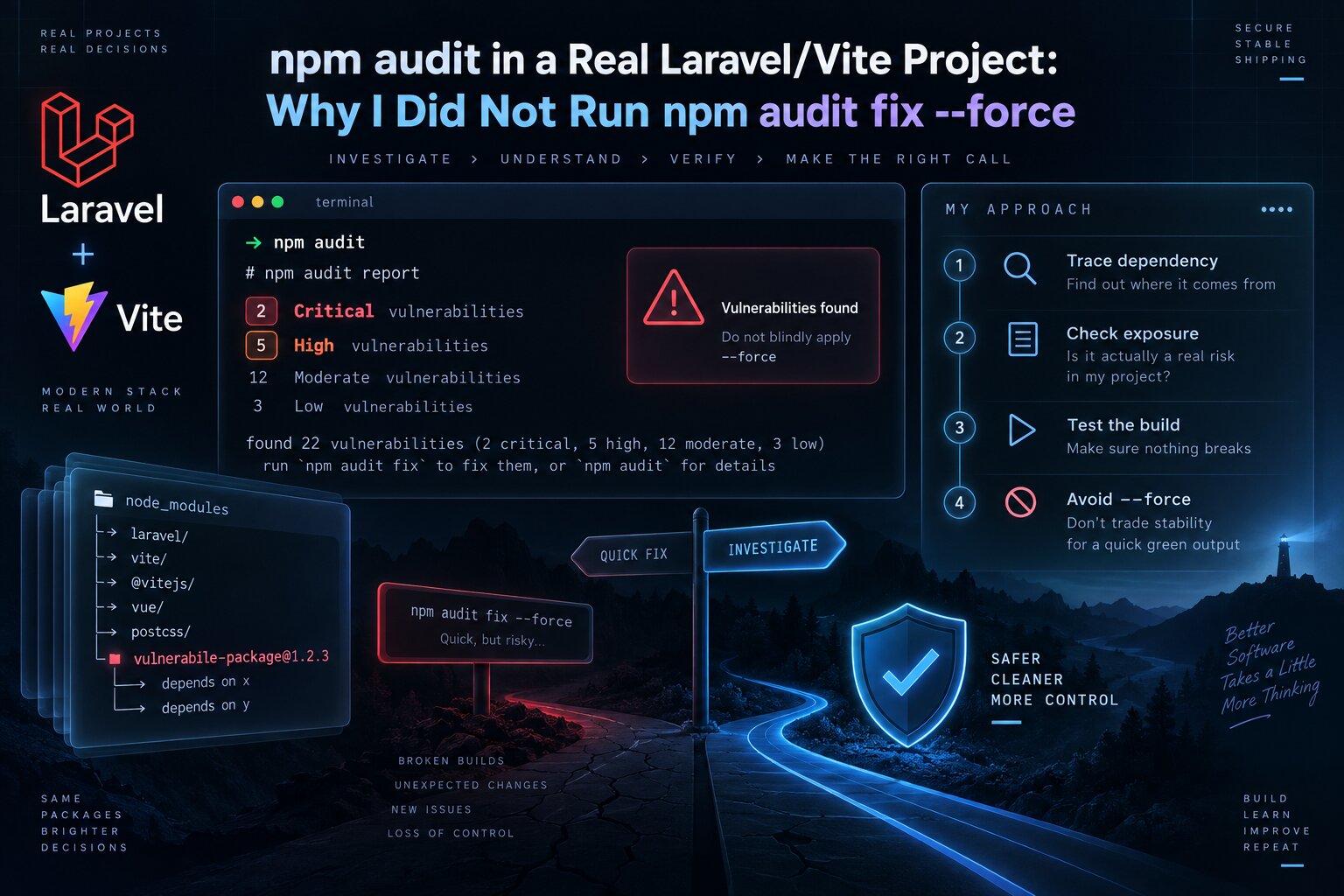
First I Capture the Actual Audit Report
I started with a repeatable view of the current dependency state rather than an automatic fix.
This matters because npm audit reflects the real package-lock.json, not only the package names listed in package.json.
npm auditnpm audit --json > /tmp/npm-audit.jsonDuring the work, the number of findings changed together with the dependency tree. A later snapshot showed 7 vulnerabilities, and another later one showed 4.
I therefore do not treat the vulnerability count as a permanent property of the project. It describes a particular lockfile at a particular point in time.
I Did Not Start with npm audit fix --force
The --force option is attractive because it promises to remove more findings automatically.
It can also allow updates beyond the compatible versions of top-level dependencies.
In a production project, a security fix can therefore turn into a framework or tooling migration at the same time.
# I did NOT start with this:npm audit fix --forceDirect and Transitive Dependencies Need Different Reasoning
An audit can report a package I never added directly to package.json.
That is expected because many vulnerabilities arrive through transitive dependencies.
The next question for each finding is therefore: which dependency pulled this package into the tree?
npm ls \ shell-quote \ concurrently \ vite \ axios \ esbuild \ form-data \ immutablenpm explain shell-quote npm explain viteThe Critical shell-quote Finding Was Not a Standalone Direct Dependency
One of the most important findings involved shell-quote with critical severity.
But shell-quote was not a package I had deliberately added to application code. In the dependency tree it was pulled in through concurrently@9.2.1.
The remediation decision therefore belongs higher in the dependency tree, not necessarily at the vulnerable package itself.
ICanUp | vconcurrently@9.2.1 | vshell-quote | vcritical advisoryVite Was Part of the Audit Report Too
The report also contained a high-severity finding involving vite.
In a Laravel/Vite project, that is a different class of dependency. Vite is central to the frontend toolchain, so an upgrade needs verification through a real production build, not only another audit.
npm ls vite npm view vite versionThe Audit Covered More Than One Part of the Toolchain
During the investigation I also saw findings related to Axios, esbuild, form-data, and immutable.
This is another reason not to respond to the entire report with one command.
Different packages can have different dependency paths, execution contexts, and upgrade costs.
Package / area | What I inspect |
|---|---|
| Which parent pulls it in and whether updating the parent is enough |
| Whether it is a direct dev dependency and which update changes the subtree |
| Build-tool compatibility after the upgrade |
Axios / form-data | Dependency path and actual execution context |
esbuild | Build-time exposure and the version used by the toolchain |
immutable | Whether it is direct, transitive, or no longer required |
Severity and Production Exposure Are Not the Same Thing
A critical advisory always deserves attention, but the severity label alone does not describe one project's architecture.
In a Laravel/Vite application, some Node packages run only during development or build and are not present as a Node runtime on the production web server.
Other packages may reach the browser bundle or be used by application code.
I do not use this distinction to dismiss dev vulnerabilities. I use it to prioritize and remediate them correctly.
npm audit --omit=devI Inspect the Planned Fix Before Applying It
There is a safer step between doing nothing and running npm audit fix --force.
I first inspect what npm can repair without allowing an aggressive major upgrade.
npm audit fix --dry-runFrom there I can evaluate direct dependencies separately and decide whether a specific package needs a controlled manual upgrade.
A Safe Fix and a Forced Fix Are Different Decisions
Approach | What it means to me |
|---|---|
| Try compatible dependency updates and review the diff |
Manual package upgrade | Change one direct dependency deliberately |
| Allow more aggressive changes that may require migration work |
Leave a finding temporarily | Only with understood exposure, documented reasoning, and a plan |
I Review the Diff After Every Dependency Change
An automated security command does not remove the need for review.
Even when most changes are in package-lock.json, I want to know which top-level and transitive versions actually moved.
git diff -- \ package.json \ package-lock.jsonnpm ls --depth=0I Repeat the Audit After Every Meaningful Change
I do not consider the work finished simply because npm install succeeds after dependency changes.
I run the same audit again and compare the new state with the previous snapshot.
npm auditOne later verification snapshot looked very different:
4 vulnerabilities 1 moderate3 highThere were no critical findings in that snapshot.
For me, that is more useful progress than blindly forcing npm to rewrite the dependency tree into any state that happens to display zero.
Zero Findings Is Not the Only Completion Criterion
Security work does not always reach found 0 vulnerabilities in one commit.
An advisory may remain in a transitive dependency that does not yet have a compatible upstream fix.
In that case, I want to know where the dependency is used, whether it is production-reachable, and which future upgrade removes it.
A Security Fix Still Has to Pass the Build
After dependency changes, the audit report is not my only verification.
Vite, esbuild, and other frontend dependencies directly affect the build pipeline.
npm run buildIf an update makes the audit look better but production assets no longer build, the work is not finished.
Then I Verify the Application, Not Only the Package Manager
- Production build finishes successfully.
- The existing frontend tests still pass.
- Public pages load correctly.
- The admin interface still works.
- Vite assets are loaded correctly.
- SSR still starts when it uses the same frontend build.
- The browser console has no new runtime errors.
- A repeated
npm auditshows the expected new state.
npm audit fix --force Could Have Become a Separate Migration
If eliminating an advisory requires moving to an incompatible major version of a direct dependency, that is no longer just a security patch.
It is a migration that deserves release notes review, configuration checks, and regression testing.
I do not want to hide that migration inside one automatic security command.
Security finding | vDoes a compatible fix exist? / \ yes no | | v vsafe update evaluate major upgrade | | v vaudit + build migration + regression testsWhat I Do Not Do After a Scary Audit Report
- Do not reflexively run
npm audit fix --force. - Do not judge risk only by the total vulnerability count.
- Do not treat every transitive package as a direct application dependency.
- Do not dismiss a critical finding only because it is under devDependencies.
- Do not upgrade every package at once without reviewing the diff.
- Do not treat a successful
npm installas sufficient regression verification. - Do not chase zero findings through an uncontrolled major upgrade.
- Do not leave unresolved high or critical findings without an explanation.
My npm audit Checklist
- Capture the full
npm auditreport. - Keep a JSON snapshot when comparing states.
- Identify direct and transitive dependency paths.
- Inspect production and development execution contexts separately.
- Review advisories and affected versions for critical and high findings.
- Preview
npm audit fix --dry-run. - Apply compatible updates in controlled steps.
- Review the
package.jsonandpackage-lock.jsondiff. - Repeat
npm audit. - Run the production build and regression checks.
- Document remaining findings together with their dependency path and plan.
This Changed How I Think About Automated Security Fixes
It is easy to think of npm audit as a command that should simply end with a green status.
In practice, the audit is the beginning of an investigation, not the finished solution.
That is especially visible in a Laravel/Vite project where the Node dependency tree contains browser dependencies, build tooling, and development utilities at the same time.
npm audit tells me where to investigate. It cannot decide which breaking upgrade is safe for my project.
What I Kept for Next Time
- Capture an audit snapshot before changing dependencies.
- Prioritize critical severity, but always inspect the dependency path.
- Separate direct from transitive dependencies.
- Separate build-time, development, and production exposure.
- Prefer compatible fixes first and treat major upgrades as separate work.
- Use dry-run before changes and Git diff after them.
- Repeat the audit after every dependency update.
- A security update is not complete until the production build passes.
- Do not demand zero findings at the cost of an uncontrolled migration.
Conclusion
The initial 9 vulnerabilities in ICanUp, including 2 critical and 5 high, were definitely not a signal to ignore the problem.
But they were not a signal to immediately run npm audit fix --force either.
I inspected dependency paths, found the critical shell-quote issue through concurrently, reviewed Vite and the other findings separately, applied controlled updates, and repeated both the audit and production build after the changes.
A later audit snapshot showed 4 remaining vulnerabilities with no critical findings.
For me, a good security fix is not the shortest command. It is a change where I understand what moved, which risk was reduced, and whether the application still behaves correctly afterward.