During an ICanUp deployment to a new VPS, composer install stopped while fetching a private GitLab package.
Composer reported that it could not clone the repository and suggested trying interactive mode.
The interesting part came next: SSH access to GitLab inside Docker was already working.
Failed to clone the git@... repository,try running in interactive modedocker compose exec workspace \ ssh -T git@gitlab.comWelcome to GitLab, @username!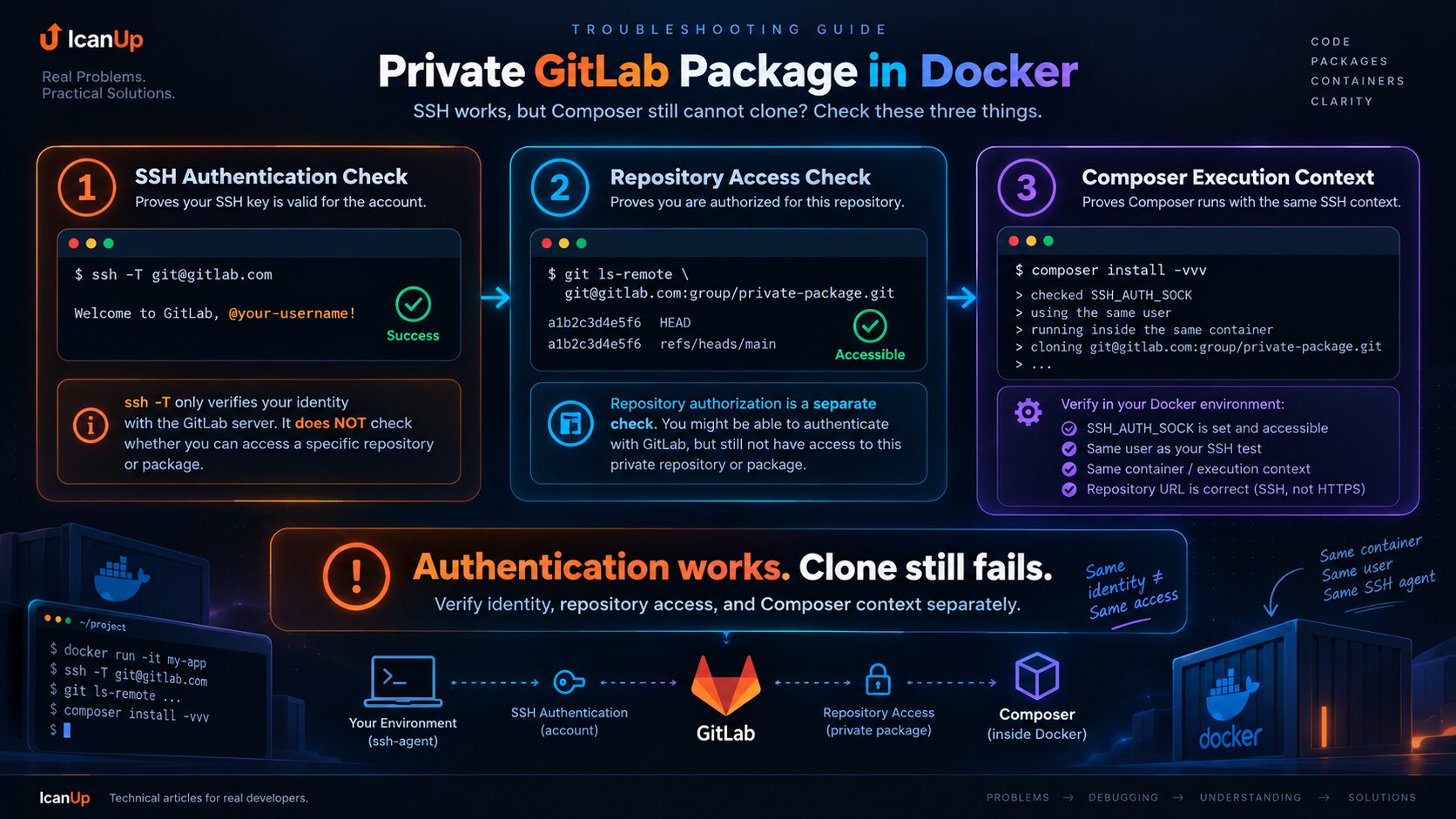
I Split One Error into Three Separate Checks
The Composer message looks like one GitLab problem, but several independent boundaries exist between composer install and a private package.
Each boundary needs to be verified separately.
Layer | What it proves |
|---|---|
| GitLab accepts the SSH identity |
| That identity can access the exact repository |
| Composer runs Git in the correct environment and uses the correct repository URL |
ssh -T Tests the Account, Not the Package Repository
This was the main logical trap.
When GitLab responds with a welcome message, it is easy to assume that SSH is completely solved.
But ssh -T confirms that the key belongs to a GitLab account.
Access to an individual private repository is a separate authorization check.
The Next Test Should Target the Exact Repository
After ssh -T, I do not immediately rerun Composer. I test the same repository that Composer could not fetch.
git ls-remote \ git@gitlab.com:group/private-package.gitgit ls-remote is useful because it verifies the real repository URL and permissions without requiring a full clone.
If this command fails, Composer is not yet the main suspect.
Then I Check the SSH Agent, Not Only the SSH Command
Inside Docker, the private key does not need to exist inside the container.
A better model is to expose the host SSH agent through its socket.
The container can then use the identity without copying the private key into an image or project directory.
echo "$SSH_AUTH_SOCK" ssh-add -ldocker compose exec workspace \ sh -lc ' echo "$SSH_AUTH_SOCK" ssh-add -l ssh -T git@gitlab.com 'I want all three signals: the socket exists, the agent has an identity, and GitLab accepts it.
Composer Must Run in the Same Context
Another common trap is checking SSH as one user and running Composer as another.
This can happen easily in Docker or deployment scripts.
A different user can have a different HOME, different SSH_AUTH_SOCK, different known_hosts, or no access to the agent at all.
docker compose exec workspace \ sh -lc ' whoami id printf "HOME=%s\n" "$HOME" printf "SSH_AUTH_SOCK=%s\n" "$SSH_AUTH_SOCK" ssh-add -l 'The SSH test and Composer need to be compared inside the same container, under the same user, and with the same environment.
sudo Can Remove SSH_AUTH_SOCK from the Environment
Running Composer through sudo can change the environment.
Then ssh -T may work for the normal user while Composer running as root no longer sees the same agent socket.
# Avoid using this as a normal fix:sudo composer installThe Repository URL Is Part of the Investigation Too
SSH can work and permissions can be correct while Composer still fails if the repository URL is stale or points to the wrong project.
This matters especially after moving a GitLab project between groups or changing repository hierarchy.
composer config --list --source \ | grep -i gitlabI also inspect composer.json and lock data depending on how the private package is configured.
grep -R "git@gitlab.com" \ composer.json \ composer.lockComposer -vvv Shows What It Actually Executes
A generic Failed to clone message does not provide enough information.
Verbose output exposes the repository URL and Git command around the actual failure.
composer install \ --no-interaction \ -vvvI use this output as evidence of the URL and transport Composer actually uses rather than guessing from configuration alone.
Interactive Mode Was Not the Real Explanation
The phrase try running in interactive mode sounds as if Composer simply wants to ask a question.
For a private Git repository, however, it can be a generic message after a failed clone.
I do not treat interactive mode as the root cause. I first determine why Git could not access the repository.
known_hosts Is a Separate Check
The SSH key and host verification solve different problems.
The agent can contain the correct key while a new environment still lacks the GitLab host key in known_hosts.
ssh-keygen -F gitlab.com ssh -vT git@gitlab.comI Do Not Copy the Private SSH Key into the Docker Image
The technically easiest workaround might appear to be copying ~/.ssh/id_* into the container.
That is the wrong security boundary for me.
A private key should not become part of an image layer, repository, or Docker build context.
Preferred: Host private key | vSSH agent | vforwarded socket | vDocker container | vGitLab Why composer clear-cache Is Not My First Step
An SSH clone failure can tempt you to clear the Composer cache.
But if git ls-remote cannot access the repository, clearing cache cannot fix that.
I verify transport, identity, repository permissions, and execution context first.
My Troubleshooting Flow
Check | What the result tells me |
|---|---|
| SSH identity works |
| The agent contains a key |
| The exact package repository is accessible |
| Composer runs in the expected environment |
| The actual URL and Git command are visible |
| The repository URL is not stale |
The Diagnostic Order That Saves Me the Most Time
- Do not rerun Composer ten times with the same error.
- Inspect
SSH_AUTH_SOCK. - Inspect identities with
ssh-add -l. - Run
ssh -T git@gitlab.com. - Test the exact repository with
git ls-remote. - Compare the user,
HOME, and environment used by Composer. - Verify the repository URL.
- Only then analyze
composer install -vvv.
This Is a Follow-Up to the SSH Agent Setup, Not a Duplicate
I previously documented the basic Composer, private GitLab repository, and Docker SSH agent setup.
This case starts one level later: the agent is already available and GitLab already recognizes the key, but that fact alone is still not enough for a successful composer install.
A Laradock Wrapper Does Not Remove the Need to Inspect the Environment
Locally, I use Laradock wrappers so commands run in the expected runtime.
That is convenient, but a wrapper should not hide which user runs the process or which SSH socket it can see.
I described the multi-PHP side separately in my Post about Laradock with multiple PHP runtimes and dphp, dartisan, and dcomposer.
What I Would Avoid
- Do not treat a successful
ssh -Tas proof that the exact private package is accessible. - Do not copy the private key into a Docker image.
- Do not run Composer through
sudojust to bypass an SSH problem. - Do not permanently disable host verification.
- Do not begin with Composer cache cleanup before repository-level verification.
- Do not test SSH as one user and run Composer as another.
- Do not ignore an old repository URL after a GitLab project transfer.
- Do not randomly update dependencies when
composer installfails at the transport layer.
What I Kept for Next Time
ssh -Tverifies account authentication, not the complete Composer flow.git ls-remoteis a fast check for exact repository access.- Verify the SSH agent through
SSH_AUTH_SOCKandssh-add -l. - Run Composer and SSH diagnostics under the same user.
- Recheck the repository URL after a GitLab project transfer or rename.
- Use
composer install -vvvto see the actual Git command and URL. - Do not copy a private key into the container.
- Split generic Composer failures into authentication, authorization, and execution-context checks.
A successful ssh -T means GitLab knows my key. It does not mean Composer can definitely clone every private repository from that container.
Conclusion
The most useful part of this case was not finding another Composer command. It was separating the failure into the right layers.
GitLab was already recognizing the SSH identity inside Docker, so repeating only ssh -T could not move the investigation forward.
The next checks are repository access, the agent socket, the Composer user and environment, repository URL correctness, and the actual Git command shown in verbose output.
In ICanUp, I now keep one rule in mind: authentication success is not the same as repository clone success.