When PHP needs a critical security update, it is easy to reduce the task to php -v, a new image, and a container restart. With Laradock, that is not enough.
One local project may run through PHP-FPM 8.3, another through 8.4 or 8.5, while separate workspace containers may be stopped. phpMyAdmin also has its own PHP runtime.
Before changing anything, I first build an inventory: which PHP runtimes exist, what is running, what is stopped, which images containers use, and what Docker Compose actually resolves.
Why One php -v Is Not Enough
php -v in a normal Ubuntu terminal shows host PHP. It does not show the version inside PHP-FPM, workspace, or phpMyAdmin.
In my local Laradock setup, PHP 8.3, 8.4, and 8.5 all had to be considered separately. The first check records host PHP without treating it as evidence about Docker.
php -vcommand -v php for binary in php8.2 php8.3 php8.4 php8.5; do if command -v "$binary" >/dev/null 2>&1; then echo "===== $binary =====" "$binary" -r 'echo PHP_VERSION, PHP_EOL;' fidoneCheck the Effective Docker Compose Configuration
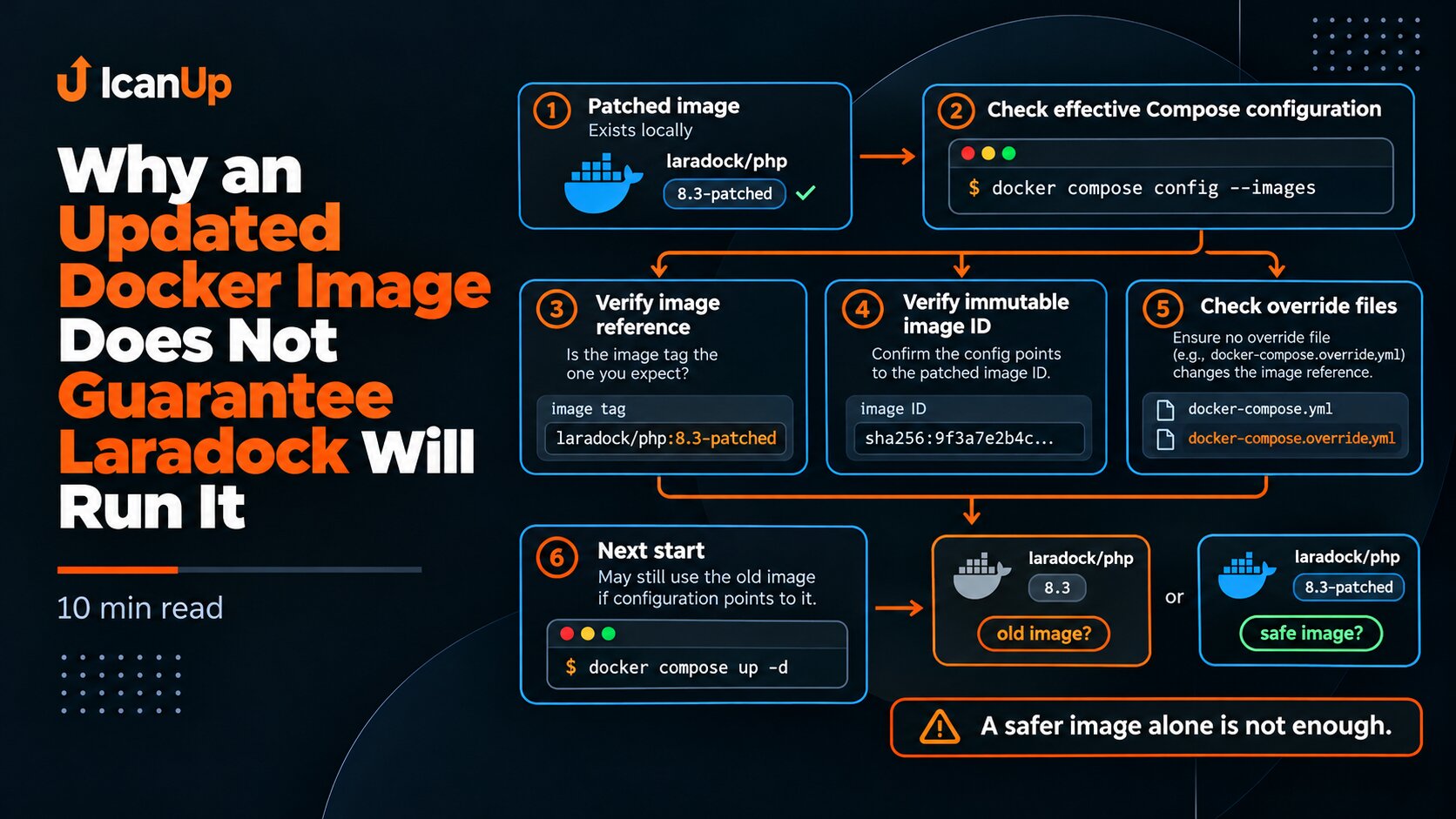
Laradock may use multiple Compose files and overrides. The important thing is to inspect the same combination that is actually used to run the environment.
For the first pass, I avoid dumping the full resolved config because it may contain expanded environment values. I validate the model and inspect only services and images.
cd ~/Projects/laradock || exit 1 docker compose config -q echo "===== SERVICES ====="docker compose config --services echoecho "===== IMAGES ====="docker compose config --imagesInspect Running and Stopped Containers
docker ps shows only active containers. That is not enough for a security update because an old stopped workspace can return on the next start.
I record the container name, image reference, image ID, and state. The image ID matters because a tag may later point to a different image.
cd ~/Projects/laradock || exit 1 docker compose ps -a echoecho "===== ALL CONTAINERS =====" docker ps -a \ --format 'table {{.Names}}\t{{.Image}}\t{{.Status}}'ids="$(docker ps -aq)" if [ -n "$ids" ]; then docker inspect \ --format '{{.Name}} | image={{.Config.Image}} | image_id={{.Image}} | state={{.State.Status}}' \ $idsfiCheck PHP-FPM 8.3, 8.4, and 8.5 Separately
A service name or image tag is not enough evidence for the actual patch version. For PHP-FPM services that are already running, I read PHP_VERSION directly from the container.
docker compose exec -T does not start a stopped service, so this check does not change its state.
cd ~/Projects/laradock || exit 1 for service in php-fpm-83 php-fpm-84 php-fpm-85; do echo "===== $service =====" docker compose exec -T "$service" \ php -r 'echo PHP_VERSION, PHP_EOL;' \ || echo "$service is not running"doneWorkspace Matters Even When It Is Stopped
In my Laradock setup, the PHP 8.3, 8.4, and 8.5 workspace services had different states. A stopped workspace should not be started only for inventory purposes.
First record its state and image. If a workspace is already running, then read its PHP_VERSION.
cd ~/Projects/laradock || exit 1 docker compose ps -a \ workspace-83 \ workspace-84 \ workspace-85 for service in workspace-83 workspace-84 workspace-85; do echo "===== $service =====" docker compose exec -T "$service" \ php -r 'echo PHP_VERSION, PHP_EOL;' \ || echo "$service is not running"doneDo Not Forget phpMyAdmin
phpMyAdmin is not the Laravel application runtime, but it still executes PHP in the local Docker environment. Its PHP version therefore belongs in the security inventory.
cd ~/Projects/laradock || exit 1 docker compose ps -a phpmyadmin docker compose exec -T phpmyadmin \ php -r 'echo PHP_VERSION, PHP_EOL;' \ || echo "phpmyadmin is not running"Inspect Local Docker Images
A container shows current usage, while the image list shows what is already stored locally and may return during the next start or rebuild.
I record repository, tag, image ID, and approximate image age.
docker image ls \ --format 'table {{.Repository}}\t{{.Tag}}\t{{.ID}}\t{{.CreatedSince}}' \ | grep -Ei 'php|workspace|phpmyadmin|laradock'Inspect Base Images and PHP Build Arguments
A local image tag does not explain what the image was built from. I also inspect relevant FROM instructions and ARG PHP_VERSION values in the Dockerfiles.
This helps distinguish an old container from a build definition that still relies on an outdated PHP base.
cd ~/Projects/laradock || exit 1 grep -RInE \ '^(ARG PHP_VERSION|FROM .*php|FROM laradock/)' \ php-fpm \ workspace \ 2>/dev/nullWhat to Record Before Updating
After the inventory, I have a baseline map of the local environment:
- PHP versions on the Ubuntu host;
- state and versions of PHP-FPM 8.3, 8.4, and 8.5;
- state of workspace 8.3, 8.4, and 8.5;
- PHP inside phpMyAdmin;
- container image references and image IDs;
- local PHP-related images;
- services and images from the effective Compose model;
- base images and PHP build arguments.
Only then is it safe to decide what must be rebuilt, recreated, or replaced.
What Not to Do During the First Inventory
During the first stage, I do not start stopped workspace containers only to inspect them, run a normal docker compose up, rebuild images, or remove old images.
The current state should be recorded first. In a large Laradock environment, one command can affect several local projects at once.
Before a security update, the important question is not only which PHP version you plan to install, but which PHP runtimes your environment is actually using right now.
Summary
Updating one PHP image and considering the job complete would be a mistake. PHP-FPM, workspace, phpMyAdmin, stopped containers, local images, and Compose can all be in different states.
Before a Laradock security update, I first collect an evidence-based inventory without changing the environment. The next step is to verify that the patched Docker image is actually the image Compose will use on the next start.