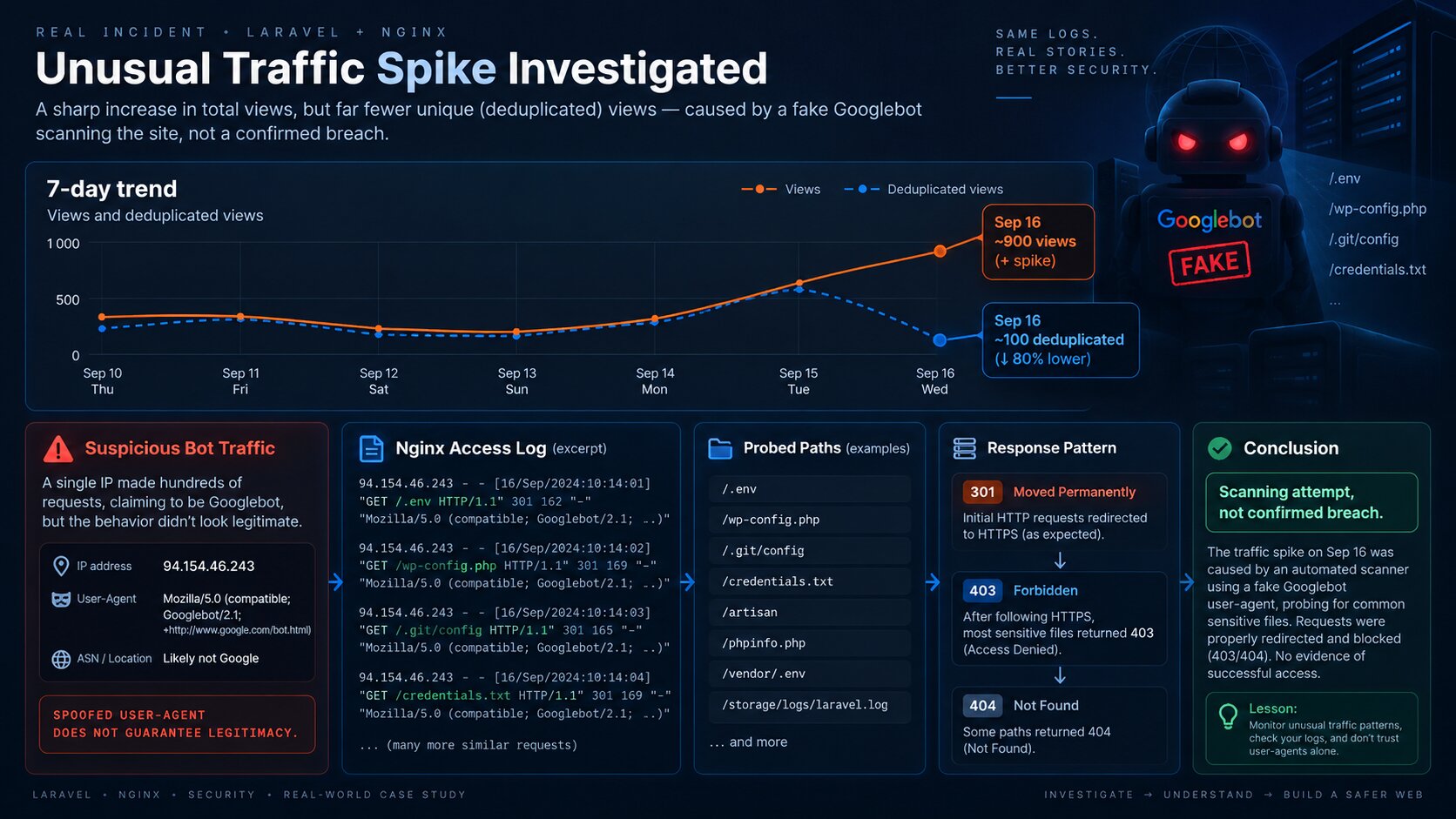
On September 16, 2026, I noticed an unusual signal in ICanUp analytics: raw views spiked sharply while deduplicated views did not follow the same curve.
At first glance, it could have looked like sudden traffic growth. In practice, such a large gap between the two metrics is a useful signal of repeated automated traffic.
Nginx access logs led me to a specific source. One IP generated about 3,300 HTTP requests in a day, identified itself as Googlebot, and systematically probed .env, credentials, cloud keys, WordPress configs, and other potentially sensitive files.
The First Signal Was in My Own Analytics
Other bot dominated the bot breakdown, while deduplicated views remained far below the raw count.
The geography breakdown also shifted heavily toward one country. That alone did not prove anything, but it strengthened the signal that the traffic pattern was unusual.
These numbers are not expected to match the Nginx request count. The access log sees every HTTP request, including probes for nonexistent paths and redirects, while application analytics counts only views that satisfy its own tracking contract.
Signal | Observed value |
|---|---|
Other bot | 831 views, about 98% of bot traffic |
AI crawler | 9 views |
Googlebot | 6 views |
Germany | 809 views, about 96% of resolved geographic traffic |
Other bot deduplicated | about 90 views |
I Started with User-Agent and Request Frequency
My first step was to inspect which IP addresses and User-Agent strings were repeating in the Nginx access log for that day.
sudo grep '16/Sep/2026' /var/log/nginx/access.log \ | awk -F'"' '{print $1 " | " $6}' \ | sort \ | uniq -c \ | sort -nr \ | head -30600 ... | Mozilla/5.0 (compatible; Googlebot/2.1; +http://www.google.com/bot.html)584 ... | Mozilla/5.0 (compatible; Googlebot/2.1; +http://www.google.com/bot.html)550 ... | Mozilla/5.0 (compatible; Googlebot/2.1; +http://www.google.com/bot.html)439 ... | Mozilla/5.0 (compatible; Googlebot/2.1; +http://www.google.com/bot.html)352 ... | Mozilla/5.0 (compatible; Googlebot/2.1; +http://www.google.com/bot.html)The log repeatedly showed 94.154.46.243 with a User-Agent claiming to be Googlebot.
A User-Agent by itself proves nothing. It is just a request header that any HTTP client can set.
Then I Checked the Most Active IPs
sudo grep '16/Sep/2026' /var/log/nginx/access.log \ | awk '{print $1}' \ | sort \ | uniq -c \ | sort -nr \ | head -203300 94.154.46.2432473 34.125.80.252431 91.196.55.136277 34.18.23.254277 34.17.35.131228 213.209.159.175218 213.209.159.133One IP generated about 3,300 requests during the day. Some requests arrived in very dense bursts, which looked much more like automated path probing than normal search crawling.
What the Client Was Actually Requesting
sudo grep '16/Sep/2026' /var/log/nginx/access.log \ | grep '^94\.154\.46\.243 ' \ | awk -F'"' '{print $2}' \ | sort \ | uniq -c \ | sort -nr \ | head -50GET /.env HTTP/1.1GET /~/.composer/auth.json HTTP/1.1GET /zipkin/.env HTTP/1.1GET /zabbix/.env HTTP/1.1GET /www/.env.production HTTP/1.1GET /www/.env.local HTTP/1.1GET /wp/wp-config.php HTTP/1.1GET /wp-config.php HTTP/1.1GET /wp-config.php.bak HTTP/1.1GET /wp-debug.log HTTP/1.1GET /wp-content/uploads/.env HTTP/1.1GET /web/laravel/.env HTTP/1.1GET /.env.aws HTTP/1.1GET /.env.redis HTTP/1.1GET /.env.stripe HTTP/1.1GET /.env.paypal HTTP/1.1The Most Important Check Was the HTTP Status Codes
sudo grep '16/Sep/2026' /var/log/nginx/access.log \ | grep '^94\.154\.46\.243 ' \ | awk -F'"' '{print $3}' \ | awk '{print $1}' \ | sort \ | uniq -c \ | sort -nr3286 30114 400This result was critical. A 301 does not mean the scanner downloaded the requested file.
The requests reached the HTTP endpoint and Nginx redirected them to HTTPS. The next step was therefore to inspect the redirect configuration and verify the HTTPS behavior directly.
I Verified the Redirects and HTTPS Server Blocks
sudo nginx -T 2>/dev/null \ | grep -nE 'server_name|listen .*443|access_log|return 30[1278]|rewrite'The configuration confirmed separate HTTP server blocks, HTTP to HTTPS redirects, and HTTPS virtual hosts for both production and development.
return 301 https://icanup.com.ua$request_uri; # devreturn 301 https://$host$request_uri;Then I Searched Every Available Nginx Access Log
sudo grep -H '94\.154\.46\.243' /var/log/nginx/*access*.log \ | tail -100In the available logs, I continued to see the same HTTP requests returning 301, including probes for /.env.stripe, /.env.paypal, /.env.aws, /.env.redis, and /credentials.txt.
I found no 200 OK responses for those sensitive paths in the traffic I investigated.
The Final Check: What HTTPS Actually Returns
curl -I https://icanup.com.ua/.envcurl -I https://dev.icanup.com.ua/.envcurl -I https://icanup.com.ua/wp-config.php.bakcurl -I https://icanup.com.ua/.git/configcurl -I https://icanup.com.ua/composer.jsonPath | Response |
|---|---|
https://icanup.com.ua/.env |
|
https://dev.icanup.com.ua/.env |
|
/wp-config.php.bak |
|
/.git/config |
|
/composer.json |
|
A Request Received Is Not the Same as a Security Breach
Public servers are scanned constantly. A request for /.env is not, by itself, evidence of compromise.
The more important question is: what did the server actually return?
My investigation did not stop at "someone requested .env". I checked response codes, redirects, HTTPS behavior, Nginx rules, and specific sensitive paths.
Observation | What it means |
|---|---|
Request for | An attempt to retrieve the file |
| A redirect, not the file contents |
| Access denied |
| The resource is not available at that path |
| Requires immediate investigation |
My Practical Checklist for Suspicious Bot Traffic
- Compare raw and deduplicated views if your analytics already shows an anomaly.
- Find the most active source IPs in the Nginx access log.
- Inspect User-Agent strings, but never treat them as proof of identity.
- Inspect the exact requested paths for a suspicious IP.
- Count HTTP response status codes.
- Verify redirect behavior and HTTPS server blocks.
- Search all available Nginx access logs.
- Test sensitive files directly over HTTPS.
- Look for
200responses on sensitive paths instead of judging the incident only by request volume. - Verify that dotfiles, Git metadata, and configuration files are not publicly accessible.
The Incident Also Explained the Raw vs Deduplicated View Gap
The analytics chart was what sent me to the Nginx logs in the first place.
Raw views jumped sharply while deduplicated views remained much lower. That is a useful signal for a large amount of repetitive automated traffic.
For a technical site, I find it useful to see humans, known crawlers, AI crawlers, unknown bots, raw views, and deduplicated views separately instead of relying on one total number.
Metric | What it helped reveal |
|---|---|
Raw views | The total volume of counted views |
Deduplicated views | How much of that volume is repetitive |
Bot family | Which automated clients are creating traffic |
Country | Whether traffic is unusually concentrated geographically |
server_tokens off Is Hardening, Not the Incident Fix
During the review, I also noticed that the server exposes the exact Nginx version in response headers:
server: nginx/*.*.* (Ubuntu)
This was not the cause of the scanning and it is not evidence of a vulnerability. Still, there is usually no need to advertise the exact version.
server_tokens off;sudo nginx -tsudo systemctl reload nginxWhat I Do Not Conclude from This Incident
- I do not describe this incident as a successful breach.
- I do not treat a Googlebot User-Agent as proof that the request came from Google.
- I do not treat a
301response as proof that a file was exposed. - I do not infer a data leak merely from thousands of requests for
.env. - I do not present
server_tokens offas the security fix for scanner traffic. - I do not block an entire country because of one suspicious source IP.
- I do not rely on one analytics metric without checking server logs.
Public server scanning is normal. What matters is not what a scanner tried to request, but whether it was able to retrieve anything useful.
Conclusion
On September 16, the sharp gap between raw and deduplicated views in ICanUp became the first signal of a large burst of automated scanning traffic.
Nginx logs showed a client claiming to be Googlebot, generating about 3,300 requests during the day and probing paths for .env, credentials, cloud keys, and configuration files.
The requests themselves were not proof of compromise. Most responses were 301 on HTTP, while the critical HTTPS paths I checked returned 403 or 404. I found no evidence in the investigated traffic that sensitive files were successfully retrieved.
My main lesson is simple: when bot traffic looks suspicious, move from the chart to the logs, from User-Agent to behavior, and from the requested path to the actual HTTP response.