A Laravel application can work normally all day and suddenly start failing to write into storage/logs after the date changes.
In ICanUp production, the cause was not Laravel logging itself. The cause was at the Linux level: the same writable directory was being used by processes running as different system users.
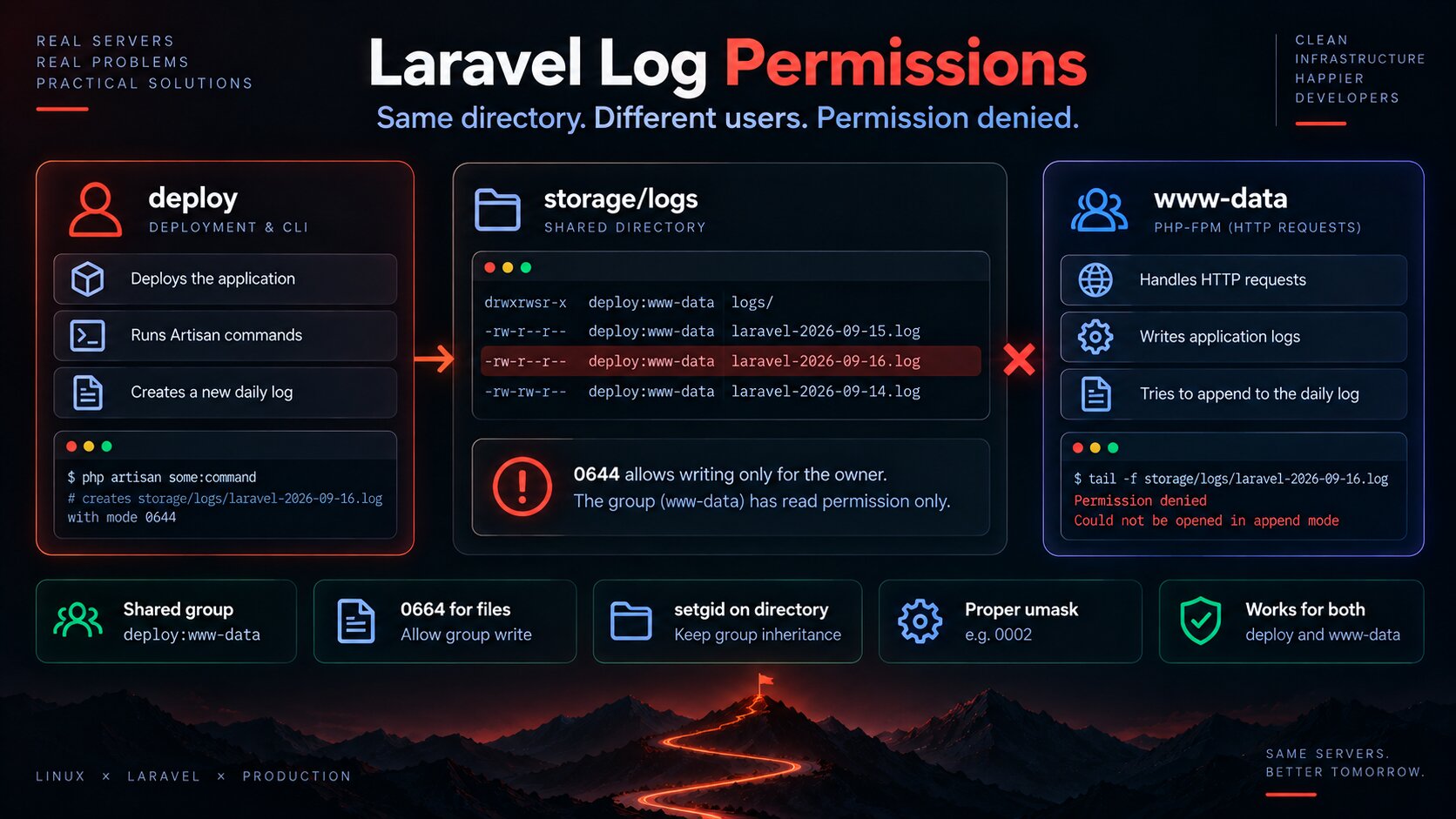
Deployment and CLI commands could run as deploy, while HTTP requests through PHP-FPM ran as www-data. If deploy created the new daily log first with mode 0644, www-data could no longer append to it later.
The Symptom Looked Like a Laravel Problem
At the application level, the symptom is simple: Laravel tries to append to the daily log file and cannot open it for writing.
storage/logs/laravel-YYYY-MM-DD.log Permission deniedCould not be opened in append modeIf you look only at the Laravel exception, it is easy to start investigating Monolog, channel configuration, or application code.
The first useful check is much simpler: who owns the file, and what are its permissions?
First Check: Owner, Group, and Mode
cd /var/www/icanup stat -c '%A %a %U:%G %n' \ storage/logs \ storage/logs/laravel-*.logThe problematic file conceptually looked like this:
-rw-r--r-- 644 deploy:www-data storage/logs/laravel-YYYY-MM-DD.logAt first glance, the group looks correct: www-data.
But 0644 means only the file owner can write. The group has read permission only.
Why deploy Can Write but www-data Cannot
Process | System user | Responsibility |
|---|---|---|
Deployment and Artisan CLI |
| Updates the application, runs Artisan commands, and may also create log files |
PHP-FPM |
| Handles HTTP requests and writes application logs |
Queue worker | Depends on production configuration | May also write into the same logs |
Neither of these users is inherently wrong. Both have a legitimate role.
The problem appears when a shared resource does not have an explicit permission contract.
0644 Explains Most of the Failure
Class | Permissions |
|---|---|
Owner |
|
Group |
|
Others |
|
For a deploy:www-data file with mode 0644, deploy can write.
PHP-FPM running as www-data receives the group permissions, and the group has no write bit.
A correct group without group write permission is therefore not enough.
Why the Problem Could Return Only When a New Daily Log Was Created
Laravel's daily channel creates a new file for a new day.
The previous file may have correct permissions after a manual fix. The next day, however, a deployment or Artisan process running as deploy may be the first process to trigger logging, and the new file can be created with a different mode again.
That is why fixing only the existing file is not enough.
chmod 777 Removes the Symptom but Destroys the Access Model
The quickest temptation is:
chmod -R 777 storageThe error may disappear because everyone can now write.
But the security boundary disappears with it.
- Any local process with access to the system receives more permissions than required.
- It becomes harder to understand which processes are actually supposed to write.
- The next permission problem is hidden instead of fixed.
- Production starts depending on unnecessarily broad filesystem permissions.
The correct solution for a shared directory is not to allow everyone to write, but to define the specific group of processes that should be allowed to write.
First I Normalize Existing Log Permissions
cd /var/www/icanup sudo chown -R deploy:www-data storage/logs sudo find storage/logs \ -type d \ -exec chmod 2775 {} \; sudo find storage/logs \ -type f \ -exec chmod 0664 {} \;For files, the resulting mode is 0664:
-rw-rw-r-- deploy:www-data laravel-YYYY-MM-DD.logNow both the owner deploy and members of the www-data group have write permission.
The Important Part Is setgid on the Directory
Mode 2775 on a directory includes the setgid bit.
For a shared directory, this matters because newly created files and subdirectories inherit the directory group instead of depending only on the creating process primary group.
sudo chown deploy:www-data storage/logssudo chmod 2775 storage/logs stat -c '%A %a %U:%G %n' storage/logsdrwxrwsr-x 2775 deploy:www-data storage/logsThe s in the group permission position indicates that setgid is active.
This solves group inheritance, but it does not by itself guarantee that every new file will be group-writable.
New Files Also Need to Be Created with 0664
For Laravel's daily channel, I want the file permission for new logs to be explicit.
The logging channel can define that permission directly.
'daily' => [ 'driver' => 'daily', 'path' => storage_path('logs/laravel.log'), 'level' => env('LOG_LEVEL', 'debug'), 'days' => 14, 'permission' => 0664, 'locking' => true,],The exact channel configuration depends on the application. The important contract is that a new file should not become writable only by whichever system user happened to create it first.
umask Complements the Contract
In addition to Laravel configuration, the umask of processes creating shared files matters.
For a deployment shell, 0002 allows group-shared files to retain group write permission.
umask 0002This matters when deployment creates more than Laravel logs and those files are later used by other processes in the same group.
I do not use umask 0000. There is no reason to make the files writable by everyone.
I Verify Access as Both Users
After changing permissions, looking at ls -l is not enough. I want to verify access as the actual production users.
cd /var/www/icanup sudo -u deploy \ test -w storage/logs \ && echo 'deploy can write' sudo -u www-data \ test -w storage/logs \ && echo 'www-data can write'If a daily log already exists, I check that file separately too:
LOG_FILE="$(ls -1t storage/logs/laravel-*.log | head -1)" sudo -u deploy \ test -w "$LOG_FILE" \ && echo 'deploy can write the log' sudo -u www-data \ test -w "$LOG_FILE" \ && echo 'www-data can write the log'It Is Also Useful to Inspect the Entire Path
A correctly configured file still cannot be reached if one of its parent directories blocks traversal for the process.
namei -l \ /var/www/icanup/storage/logs/laravel-YYYY-MM-DD.logAfter the Fix, I Verify the Next New File
This is the most important part of verification.
If I repaired only the current file, the problem can return the next day. The fix is proven only when the next new daily log automatically receives the correct group and mode 0664.
What to verify | Expected result |
|---|---|
Owner | May depend on which process created the file |
Group |
|
Mode |
|
Directory | setgid is active |
PHP-FPM | Can append to the file |
Deployment / CLI | Can also append to the file |
This Is a Production Contract, Not a One-Time Server Command
After this incident, I stopped treating storage permissions as a one-time setup step performed during the first deployment.
They are part of the production contract between multiple processes.
deployhas explicitly defined permissions.www-datahas explicitly defined permissions.- Shared writable directories use a shared group.
- Directories use setgid where group inheritance is required.
- New files are created with group write permission.
- Deployment does not repair permission problems with
777. - Verification covers future files, not only current ones.
This is also why I prefer production deployment to be reproducible instead of becoming a collection of manual server fixes. I described the broader process in my article about a real Laravel CI/CD pipeline.
What I Do Not Do
- Do not use
chmod -R 777 storageas a permanent fix. - Do not repair one current log file and consider the problem solved.
- Do not run PHP-FPM as
rootto bypass permission problems. - Do not run application commands through
sudowithout considering which files they create. - Do not rely on the correct group without group write permission.
- Do not rely on
0664alone if future files can inherit the wrong group. - Do not test access only as my own SSH user.
My Short Production Checklist for Laravel Logs
- Identify every system user that can write Laravel logs.
- Inspect owner, group, and mode with
stat. - Verify the PHP-FPM user.
- Use a shared group for processes that genuinely need write access.
- Set setgid on the shared writable directory.
- Use
0664for log files when the group needs write access. - Verify Laravel daily channel permissions.
- Verify a compatible
umaskfor processes creating shared files. - Test the directory and file as both
deployandwww-data. - Repeat the verification after a new daily log has been created.
I consider a permission problem fixed not when the current file becomes writable again, but when the next file is created correctly without manual intervention.
Conclusion
The Laravel log failure in ICanUp production turned out to be a classic conflict between multiple system users.
deploy could create the new daily log first. The file had the www-data group, but mode 0644 gave that group read permission only. When PHP-FPM running as www-data tried to append the next message, it received Permission denied.
A one-time chmod only repairs the current file. 777 simply removes the access boundary.
The stable fix combines several pieces: a shared group, setgid on the directory, 0664 for log files, a compatible umask, and verification from each real production user.
My main lesson is that permissions for shared runtime files need to be designed as explicitly as database credentials, queue workers, or deployment flow.