A successful CI/CD pipeline does not automatically mean production is healthy after a deployment.
Commands can exit successfully and files can reach the server while the application still fails to boot, cannot reach the database, has missing frontend assets, or is running without a queue worker.
In ICanUp, I therefore treat two events separately: the code was deployed and the deployed version was verified in production.
The Problem: Deployment Finished, but That Is Not Proof of Health
Without explicit post-deployment verification, it is easy to rely only on the exit code of the deployment script.
That exit code answers whether a particular sequence of commands completed.
It does not prove that a user can already open the site or that all supporting services work together.
What succeeded | What it still does not prove |
|---|---|
| Laravel can boot |
| The application can reach the database |
Migrations | The HTTP response is healthy |
Asset build | Workers and Reverb are running |
Supervisor restart | Every process remains in RUNNING state |
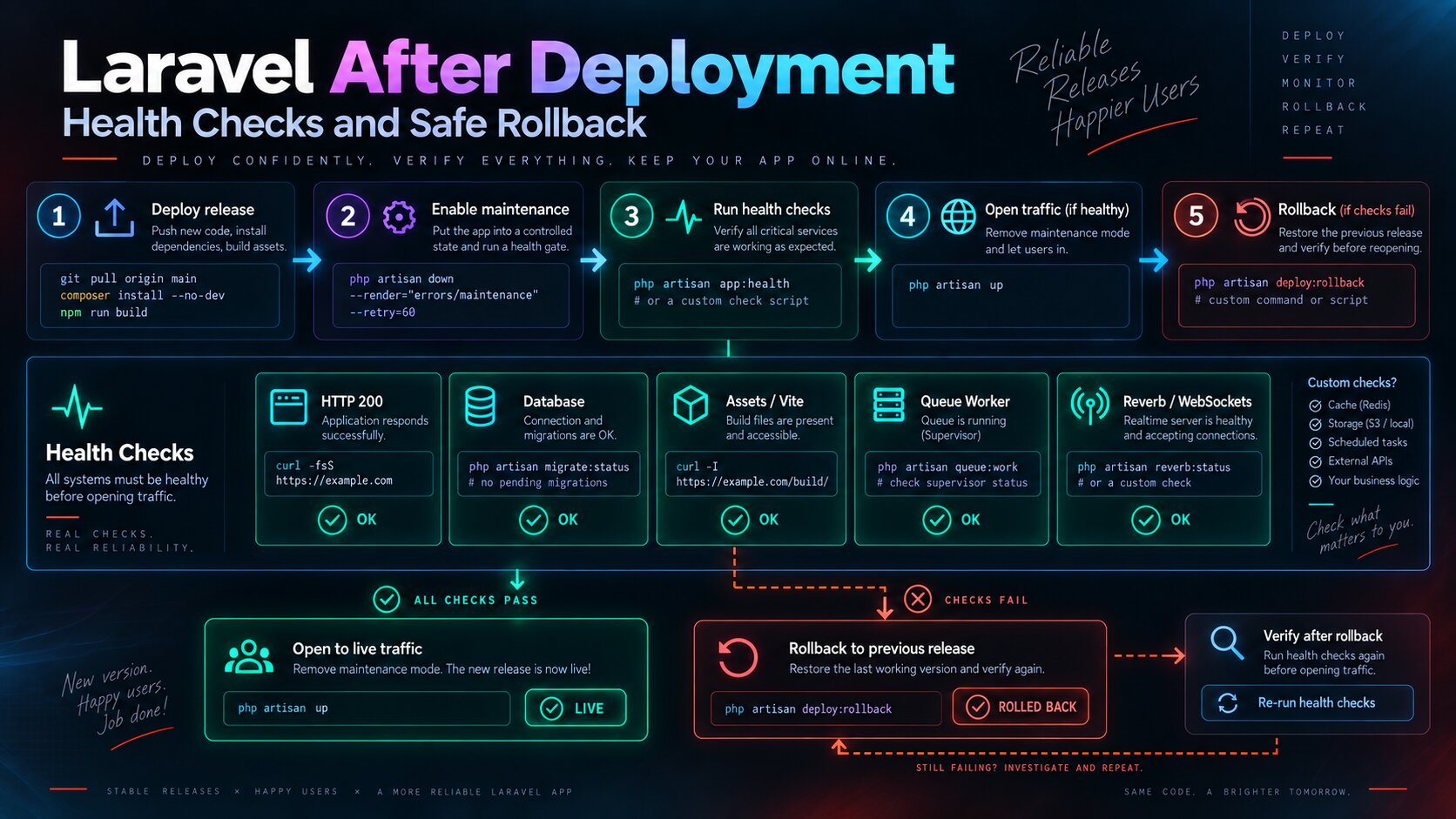
I Use Layered Verification
A single request to the homepage is not enough either.
An HTTP 200 response can exist while a queue worker, database connection, or Reverb service is broken.
I therefore verify several layers independently.
- Which commit was actually deployed.
- Whether Laravel can boot.
- Whether the database is reachable.
- Whether the site responds over HTTP.
- Whether the frontend assets exist.
- Whether Supervisor processes are running.
- Whether the queue worker is running.
- Whether Reverb is running and listening on its configured port.
I Record the Commit Before Anything Else
Rollback requires an exact answer to two questions: which version was stable before the deployment, and which version is running now?
"Go back to the previous version" is unsafe when that version is not represented by an unambiguous Git SHA or tag.
DEPLOYED_SHA="$(git rev-parse HEAD)" printf '%s\n' "$DEPLOYED_SHA"The SHA can be stored as deployment metadata so a failure does not require guessing from file timestamps or memory.
Laravel Boot Is a Separate Check
The next layer is confirming that the framework can boot the application in the production environment.
This catches configuration errors, missing classes, broken service providers, and other failures that can happen before normal HTTP handling succeeds.
php artisan about > /dev/nullThe Database Connection Is Checked Independently
Laravel can boot even while the production database is unreachable or its credentials are wrong.
The database therefore needs its own verification step.
php artisan tinker --execute='DB::connection()->getPdo();echo "Database OK\n";'For automated deployments, a dedicated command or health endpoint is usually cleaner, but the principle is the same: test a real connection instead of only checking that DB_* variables exist.
The HTTP Check Must Be Able to Fail the Deployment
After internal checks, I test the application from the outside.
In CI/CD, printing an HTTP status into the log is not enough. The command itself should fail when the control URL is unavailable.
HEALTH_URL="${HEALTH_URL:-https://icanup.com.ua/}" curl \ --fail \ --silent \ --show-error \ --location \ "$HEALTH_URL" \ > /dev/nullThe --fail option matters here. Without it, an HTTP 500 response can still look like a successfully executed curl command.
Frontend Assets Can Break an Otherwise Healthy Backend
In a Laravel application using Vite, the backend can be healthy while the user receives a page without JavaScript or CSS because the build artifact is missing or does not match the deployed code.
A minimal server-side check is confirming that the Vite manifest exists.
test -s public/build/manifest.jsonThis does not replace a browser smoke test, but it catches the basic class of failures where application code was deployed without the corresponding frontend build.
Supervisor Needs Verification After Restart
A restart command can finish while an individual process starts and immediately exits.
I therefore inspect the current state of the managed processes after restarting them.
sudo supervisorctl statusFor ICanUp, the important services include the queue worker, Reverb, and the SSR process.
I need the processes to remain in RUNNING state after deployment, not merely to exist in Supervisor configuration.
The Queue Worker Is Its Own Health Concern
A broken queue worker does not necessarily make the homepage unavailable.
The site can appear healthy while background jobs silently accumulate.
This is why HTTP 200 cannot be the only post-deployment check.
sudo supervisorctl status \ | grep -E 'worker|RUNNING'Reverb Needs Both a Process Check and a Port Check
For a WebSocket service, knowing that Supervisor attempted to start the process is not enough.
I also want to know that the service is listening on the expected configured port.
sudo supervisorctl status \ | grep -i reverb ss -lntCritical Checks Must Fail the Pipeline
If Laravel cannot boot or the production URL is unavailable after deployment, a green pipeline status would be misleading.
Critical verification commands therefore need to propagate failure.
set -euo pipefail php artisan about > /dev/null test -s public/build/manifest.json curl \ --fail \ --silent \ --show-error \ --location \ "$HEALTH_URL" \ > /dev/nullThe Verification Order Matters
I prefer to run cheaper and more specific checks first and external checks later.
This makes the deployment log much more useful because it shows the layer where the failure appeared.
1. Deployed commit SHA | v2. Laravel boot | v3. Database connection | v4. Frontend assets | v5. Supervisor processes | v6. Queue worker / SSR / ReverbWhen Rollback Begins
Rollback should not be triggered by every cosmetic warning.
But a critical failure needs a defined response rather than ten minutes of manual production editing.
- Laravel cannot boot.
- The production database cannot be reached.
- The control HTTP request fails.
- The required Vite build is missing.
- A critical Supervisor process does not stay in RUNNING state.
- Reverb or another required service cannot start.
Rollback Starts from a Known Stable SHA
I do not want to recover production by copying individual older files.
The application should return to an exact Git state that was already known to be healthy.
PREVIOUS_SHA="<previous-stable-commit>" git fetch origin git reset --hard "$PREVIOUS_SHA"Rollback Must Pass the Same Verification
Restoring the Git SHA alone is not enough.
After rollback, I run the same health checks again.
Otherwise there is no evidence that the previous version was actually restored correctly.
New deploy | vHealth check failed | vRollback to known stable SHA | vRun deployment steps again | vRun the SAME health checks | +-- fail -> investigate / recovery |Database Migrations Make Rollback Harder
The most dangerous mistake is assuming that restoring a Git commit also restores the database.
Code can be rolled back in seconds while a destructive migration may already have removed a column, transformed data, or made the old code incompatible with the new schema.
Code rollback and database rollback are different operations.
Change | Rollback characteristics |
|---|---|
New nullable column | Older code can usually ignore it |
New table | Often compatible with older code |
Rename column | Can immediately break older code |
Drop column | Git rollback does not restore lost data |
Data migration | Needs a separate recovery strategy |
Risky Migrations Need a Backup Before Deployment
If a production migration can modify or delete important data, the rollback procedure starts before deployment.
I need a verified backup before that change rather than relying on php artisan migrate:rollback as a recovery system.
I Prefer Backward-Compatible Schema Changes
The safest deployment is one where the new and previous application versions can temporarily work with the same schema.
For example, I can add a nullable column first, deploy the new code, migrate data later, and remove the old column in a separate release.
This makes application rollback much safer.
Maintenance Mode and Health Checks Solve Different Problems
A maintenance page answers what users should see while the application is temporarily unavailable during deployment.
A health check answers a different question: whether the new version is ready for normal operation.
The mechanisms complement each other, but they are not interchangeable.
This Extends My Real CI/CD Process
I previously described the deployment pipeline itself in my article about a real Laravel CI/CD pipeline in ICanUp.
Post-deployment verification became the next layer: the pipeline should not only deliver code, it should prove that the deployed version is healthy.
My Short Production Checklist
- Record the SHA of the previous stable version.
- Deploy the new commit.
- Verify Laravel boot.
- Verify a real database connection.
- Verify the Vite manifest and required assets.
- Restart the managed processes.
- Confirm the queue worker, SSR, and Reverb are running.
- Verify the required Reverb port.
- Run an external HTTP check.
- Store the SHA of the successfully deployed version.
- Run the documented rollback on a critical failure.
- Repeat the complete verification after rollback.
What I Would Avoid
- Do not treat a successful git pull as proof of a successful deployment.
- Do not rely on HTTP 200 alone.
- Do not verify Supervisor only by running restart.
- Do not leave the deployed commit SHA unknown.
- Do not repair production by manually copying individual files.
- Do not treat Git rollback as database rollback.
- Do not run risky destructive migrations without a backup.
- Do not use migrate:rollback as the only data recovery strategy.
- Do not consider rollback complete before health verification passes again.
A deployment is not complete when the code reaches the server. It is complete when I can prove that the deployed version actually works.
What I Kept for Next Time
- Verify production at multiple layers instead of relying on one HTTP request.
- Know the exact SHA of the current and previous stable versions.
- Check Laravel boot and database connectivity separately.
- Verify assets after every deployment.
- Inspect the real Supervisor process state after restart.
- Treat the queue worker, SSR, and Reverb as part of application health.
- Make critical health checks capable of failing the pipeline.
- Run the same checks again after rollback.
- Treat database recovery separately from Git rollback.
- Create a backup before risky production migrations.
Conclusion
Post-deployment verification in ICanUp turned deployment from a sequence of commands into a controlled process.
I do not only want to know that a new commit reached the server. I want to confirm Laravel boot, database access, frontend assets, queue workers, SSR, Reverb, and the external HTTP response.
If a critical check fails, I need a known previous stable SHA and a documented recovery path.
And for migrations I keep one separate rule: rolling back application code does not automatically restore the database state.