Maintenance mode is sometimes enabled too early: first the site becomes unavailable, then dependency installation, frontend build, configuration validation, and other checks begin.
The problem is that many of those operations can fail before there is any need to touch the active application version.
If the frontend build fails, Composer cannot install dependencies, or configuration cannot be prepared, users should not sit behind a maintenance page while we discover that.
Everything that can be checked before downtime should be checked before downtime.
Split Deployment Into Preparation and the Critical Window
PREPARATION- fetch code- validate dependencies- install dependencies- build frontend- validate configuration- run safe checks- prepare the new release CRITICAL WINDOW- enable maintenance mode if actually required- apply incompatible changes- switch the active release- run short checks- disable maintenance modeThis separation changes the logic of the process.
During preparation, the currently active site continues to serve users. If any check fails, deployment simply does not enter the next phase.
Users should not notice the failed attempt at all.
The Build Should Fail Before the Site Becomes Unavailable
npm cinpm run buildA frontend build can fail because of a syntax error, missing package, incompatible Node.js version, or a Vite problem.
None of those failures requires the currently active site to be unavailable.
The build should therefore succeed on the prepared release before any active-code switch happens.
Dependency Checks Belong Before Maintenance Too
composer validate --no-check-publishcomposer install \ --no-dev \ --prefer-dist \ --no-interaction \ --optimize-autoloaderA broken composer.lock, unavailable package, or incompatible PHP version can stop dependency installation.
This is another category of failure that should be discovered before maintenance mode.
If dependencies cannot be installed, the new release simply is not ready to become active.
Prepare and Validate Configuration Before the Switch
php artisan config:clearphp artisan config:cachephp artisan route:cachephp artisan view:cacheIf config:cache or route:cache fails, that is also not a reason to take the site down first.
These commands can be run against the prepared release to confirm that the application can build the required caches.
The important part is to run them in the new release location rather than modifying the active release too early.
Validate the Environment Before the Critical Window
php -vnode --versioncomposer --versiondf -hAn incompatible PHP version, missing Node.js, insufficient disk space, or another environment problem should not be discovered after the site is already unavailable.
These checks are cheap and do not modify production data, so they naturally belong near the beginning of the process.
Run Safe Automated Checks Earlier
If some tests, application-container checks, or other safe validations can run against the prepared release, they should also be part of preflight.
The goal is not to move absolutely everything before maintenance mode. The goal is to leave inside that window only what cannot be done safely without it.
What May Actually Belong Inside Maintenance Mode
Maintenance mode makes sense where there is a short incompatibility window between the old and new versions.
Examples include schema changes that are incompatible with the currently running code, switching the active release, or a short operation where concurrent writes are unsafe.
Even then, first verify whether full downtime is actually required. Some migrations can be designed to remain compatible with both old and new code and run without taking the site down.
The Wrong Order Extends Downtime Without Adding Safety
Bad order: maintenance ON -> composer install -> npm build -> config cache -> tests -> migration -> switchmaintenance OFF If npm build fails:the site is already unavailable even though production state has not changed yet.In this flow, maintenance mode does not make deployment safer. It only adds user-visible downtime.
If the build fails, deployment has not even reached the step that might justify temporarily taking the site offline.
A Better Order Fails Before Downtime
Better order: prepare release -> composer install -> npm build -> config / route / view checks -> safe tests -> environment checks if anything fails: STOP current site remains active if preflight passes: maintenance ON if required -> critical migration / switchIn this version, a failed preparation phase does not affect the active site.
Maintenance mode starts only after the new release has passed as many validations as reasonably possible.
Preflight Does Not Replace Rollback
Even perfect preflight cannot guarantee that no problem will appear only under real traffic or real data after the switch.
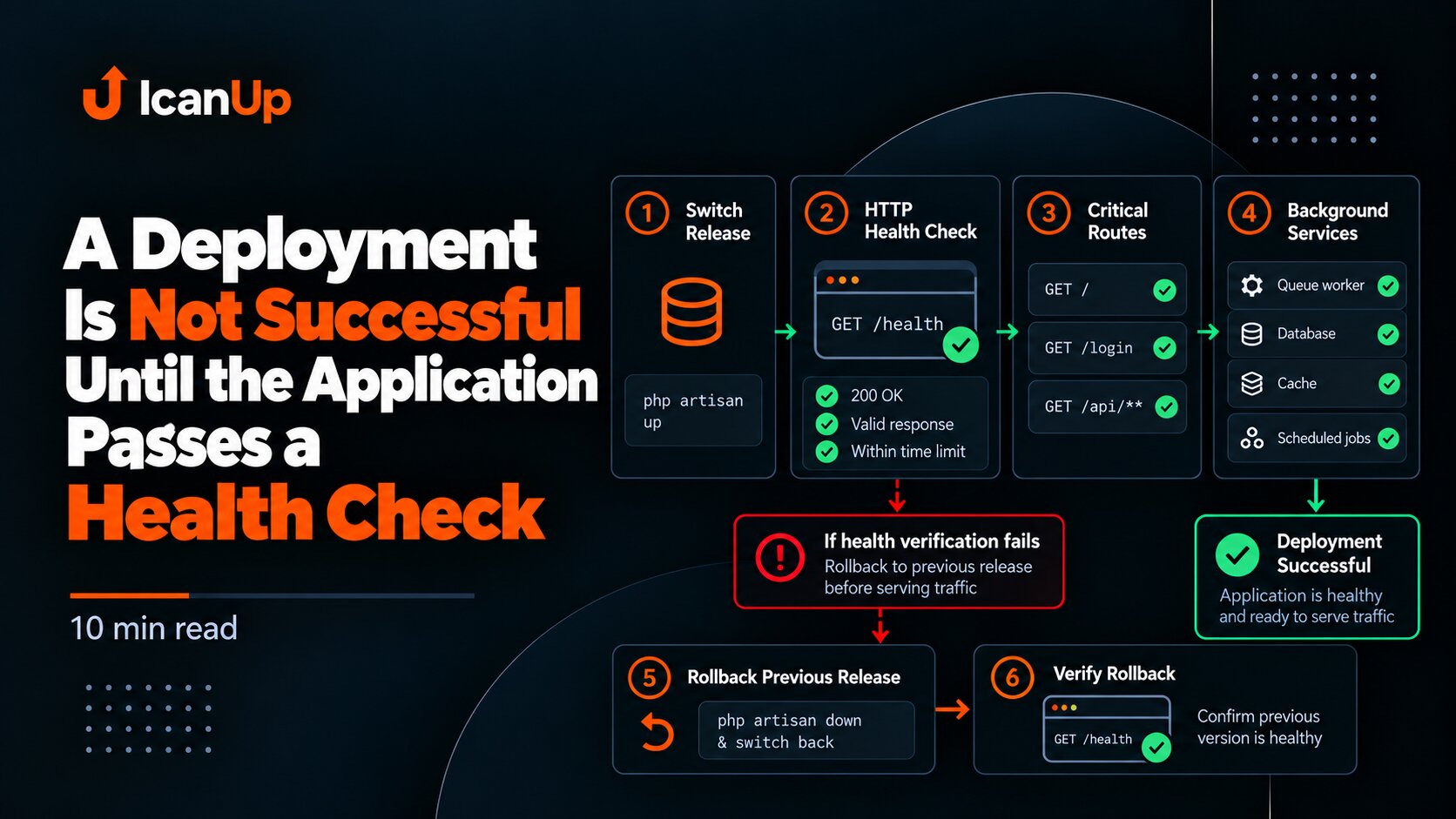
A separate rollback path is therefore still required: the previous release should remain available for restoration and post-switch steps should remain controlled.
Preflight reduces predictable failures. Rollback protects against failures discovered only after activation.
Post-Switch Checks Should Be Short and Focused
If the site is already in maintenance mode, that is not the time to run long validation suites that could have run earlier.
After the switch, verify the essentials: the new release starts, the application responds, the database is reachable, and a critical route works.
Long tests should remain outside the short downtime window.
A Failed Preflight Must Stop Deployment
npm run build || exit 1php artisan config:cache || exit 1php artisan route:cache || exit 1 # Only after all preparation checks pass:php artisan downPreflight is useful only when failure actually blocks further deployment.
If a command fails and the script still continues to php artisan down, the safeguard exists only on paper.
The Same Principle Applies: Catch Instability Before the Critical Boundary
This approach fits the same idea I described in the separate article about using a release branch as an integration boundary: unstable changes should be collected and validated before they cross the boundary where failures affect users.
For deployment, that boundary is the moment we begin changing active state or making the site unavailable.
What to Test in the Deployment Flow
1. Composer failure stops before maintenance mode.2. npm build failure stops before maintenance mode.3. config:cache failure stops before maintenance mode.4. route:cache failure stops before maintenance mode.5. The active site keeps serving during failed preparation.6. Maintenance mode starts only before critical steps.7. A short smoke check runs after the switch.8. A tested rollback path exists for post-switch failure.Maintenance Mode Should Be the Last Boundary, Not the First Step
A reliable deployment does not begin by taking the site down.
First, the new release should prove that it is technically ready: dependencies install, the build succeeds, configuration can be prepared, the environment meets requirements, and safe checks pass.
Only then should deployment enter the short section that may genuinely require maintenance mode.
The later downtime starts and the fewer steps remain inside it, the less likely users are to wait because of a failure that could have been found earlier.
Do not take the site down to discover a failure you could have found while it was still serving users.