When a Laravel project uses only a local disk, file storage looks simple: files are written into storage and read from the same filesystem.
Production storage often behaves differently. Files may live in S3 or another S3-compatible object store, remain private, upload directly from the browser, and be accessed through temporary URLs.
If local development uses only the local disk, some important production behavior is never exercised.
This is where MinIO became useful for me.
Why I Use MinIO Locally
My goal is not to reproduce all of AWS on a laptop.
I need an environment where Laravel talks to object storage through an S3-compatible API instead of a local directory.
This allows me to exercise behavior that differs from a normal local disk:
- private files;
- buckets instead of local directories;
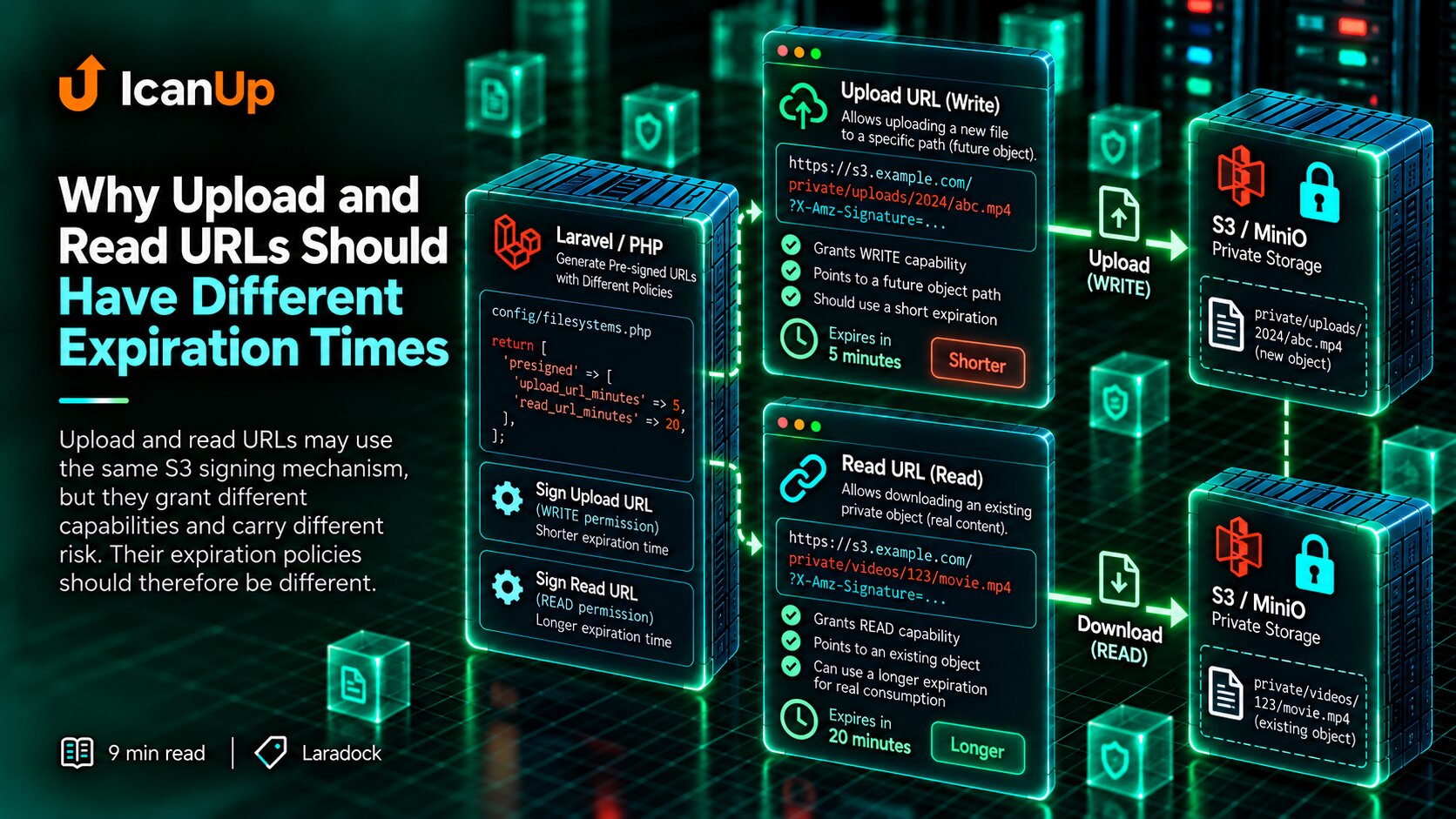
- temporary URLs;
- direct uploads;
- S3 endpoints;
- Laravel Filesystem using the
s3driver.
Local Development Should Not Depend on Real AWS
Technically, a local project could connect directly to AWS.
I do not want that for everyday development.
Local tests should not create accidental files in a real bucket, depend on internet access, or require production-like credentials just to verify an ordinary upload flow.
MinIO keeps that entire cycle inside the Docker environment.
Laradock Already Included a MinIO Service
laradock/├── docker-compose.yml└── minio/ ├── compose.yml └── defaults.envMy first step was not to write a new Dockerfile or another Compose service.
I inspected Laradock first.
It already contained a minio service with its own compose.yml and defaults.env.
This is a useful practical rule: before adding another container, check whether the environment already provides the integration.
MinIO Uses Separate Ports for the API and Web Console
9000-> S3-compatible API 9001-> MinIO web consoleIn our Laradock setup, the MinIO API runs on port 9000 and the web console on 9001.
The ports have different purposes.
Laravel talks to the S3-compatible API on 9000.
Port 9001 is useful for development: opening the console, inspecting buckets, checking objects, and reviewing configuration.
localhost Inside a Container Is Not MinIO
Host browser http://localhost:9001 | vMinIO console Laravel / PHP container http://minio:9000 | vMinIO APIThis is an easy detail to miss.
In a browser on my host machine, localhost:9001 refers to the exposed MinIO port.
Inside the PHP container, however, localhost means the PHP container itself.
The application therefore reaches MinIO through the Docker service name:
http://minio:9000
I Start MinIO as a Regular Laradock Service
cd ~/Projects/laradock docker compose up -d minio docker compose ps minioBecause the service already exists in Laradock, I do not need a separate stack just for MinIO.
It runs alongside the other local services and uses the same Docker network.
I Verify MinIO from the PHP Container, Not Only from the Browser
curl -i \ http://minio:9000/minio/health/liveAn accessible web console does not prove that the Laravel container can reach MinIO.
I therefore also checked http://minio:9000/minio/health/live from the PHP environment.
A 200 OK response confirms the same network path the application will later use.
Laravel Still Treats MinIO as S3-Compatible Storage
AWS_ACCESS_KEY_ID=laradockAWS_SECRET_ACCESS_KEY=laradockAWS_DEFAULT_REGION=us-east-1AWS_BUCKET=local-files AWS_ENDPOINT=http://minio:9000AWS_USE_PATH_STYLE_ENDPOINT=trueOne reason I like this approach is that I do not create a separate MinIO filesystem implementation.
Laravel already works with S3 through Filesystem. For the local environment, credentials, bucket, and endpoint change.
Application code can keep using Storage without knowing whether MinIO or an external S3-compatible service is behind it.
Path-Style Access Matters for Local MinIO
For local MinIO I use AWS_USE_PATH_STYLE_ENDPOINT=true.
The bucket then appears in the request path, which works well with a local endpoint based on the Docker service name.
This avoids requiring separate local DNS names for every bucket.
I Start with a Private Bucket
If files are not meant to be public, I do not make the bucket public merely to simplify local development.
Doing so would hide an important part of production behavior.
A private bucket forces the application to model file access correctly from the beginning.
Why a Normal Local Disk Is Not Enough for This
local disk Laravel | vfilesystem path | vlocal file MinIO Laravel | vFor a simple Storage::put(), both options may look almost identical.
Behavior diverges as soon as storage requirements become more advanced.
Object storage introduces endpoints, buckets, HTTP access, visibility rules, and signed URL mechanisms.
That is why I want this model present during local development.
What This Enables Next
MinIO + Laravel Filesystem | +--> private files | +--> temporary URLs | +--> direct browser uploads | +--> Range requests | +--> local S3 testingThe MinIO container alone does not solve application file handling.
But it gives me a local foundation for testing Laravel Filesystem, private access, temporaryUrl(), direct uploads, and other S3 workflows separately.
Those next steps are what I want to cover in the rest of the series.
What I Check After Connecting MinIO
My basic checklist:
- Does Laradock already contain a MinIO service?
- Is the container running?
- Is the web console available on port 9001?
- Can the PHP container reach
http://minio:9000? - Does the health check pass?
- Does the required bucket exist?
- Does Laravel use the S3 driver rather than a separate MinIO implementation?
- Does the Docker-side endpoint use the service name instead of localhost?
- Do private files remain private?
MinIO Is Not Useful Just Because It Is Another Container
MinIO itself is not the goal.
Its value is that a local Laravel project can work with the same storage model required by S3-compatible production storage.
I can develop without depending on real AWS while still avoiding the oversimplification of a plain local directory.
Laradock makes the first step especially convenient because MinIO is already available as one of its services.
For me, local MinIO is not a replacement for AWS. It is a way to exercise S3 behavior before the code reaches production.
If production relies on object storage, I want to exercise that model locally rather than for the first time after deployment.