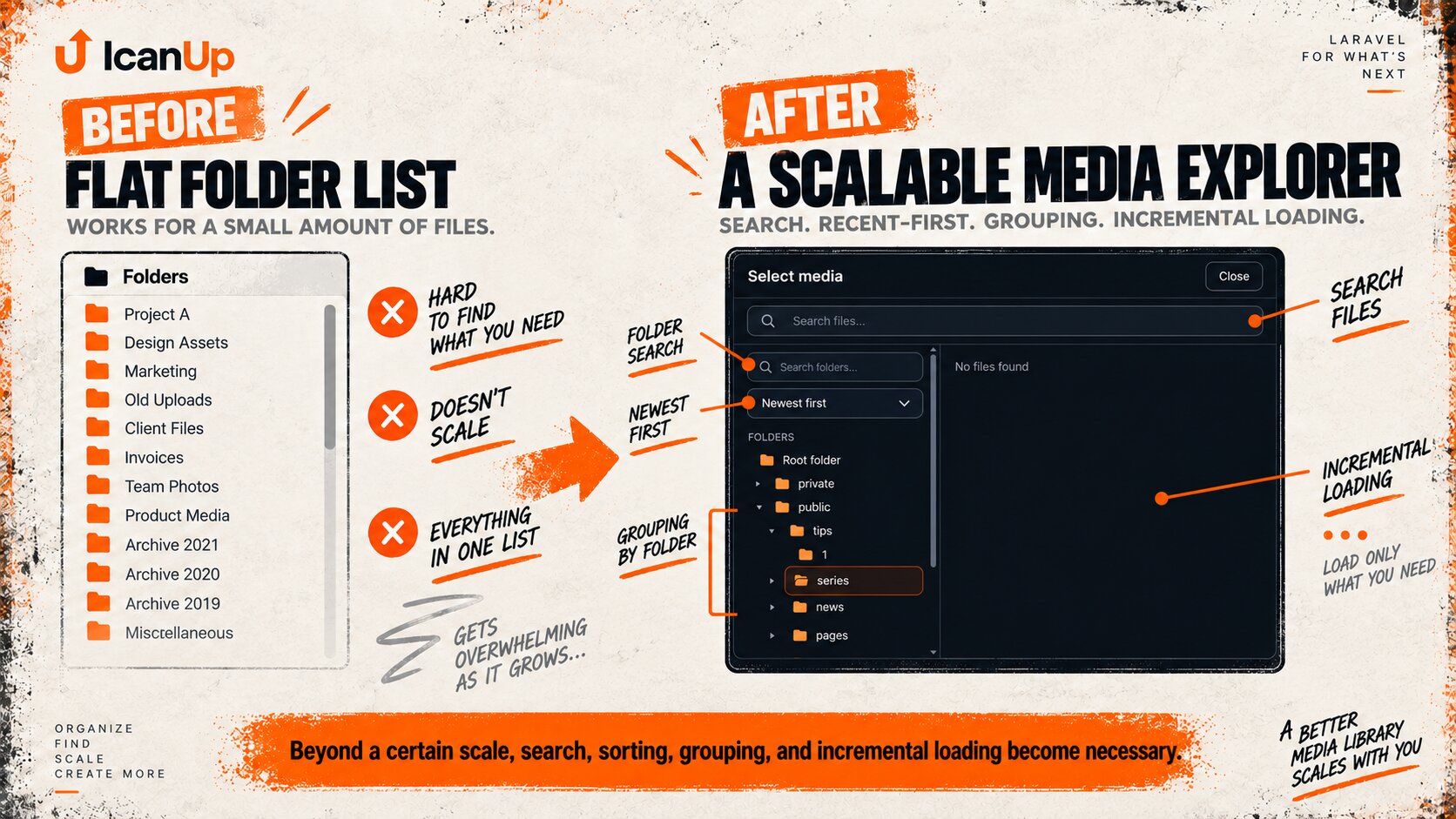
Once the Media Explorer in ICanUp had around 60 post folders, I noticed a very simple problem: finding the newest folder required scrolling through the list again and again.
Sixty folders are still manageable. Four hundred already create a poor interface. With a thousand folders, a flat list becomes a problem for both the user and the client application.
I did not want to solve this by adding a larger scroll area. The navigation contract needed to change: newest folders first, search without loading the complete collection, predictable sorting, and incremental data loading.
Laravel Media Explorer with Hundreds of Folders: Why a Flat List Stops Working
The large-list problem is not limited to long scrolling.
Loading every folder at once also increases:
- API response size;
- the number of DOM elements;
- rerender cost;
- the time required to visually find a folder;
- the risk of resetting state during later loads;
- mobile interaction cost.
Small collection: root├── folder 1├── folder 2├── folder 3└── folder 4 Large collection: root├── hundreds of folders├── more folders├── more folders└── user keeps scrolling...Newest Folders First: created_at DESC as the Default Order
In my workflow, the folder I need most often is not the oldest one. It is usually the folder I just created for a new piece of content.
The default order therefore became created_at DESC: newest folders are immediately available at the top.
// Simplified query contract. $folders = $query ->orderByDesc('created_at') ->orderByDesc('id');A secondary criterion is useful when several records share the same creation timestamp.
The exact tie-break implementation can vary, but the result should not change unpredictably between requests.
Folder Sorting: Newest, Oldest, Name A-Z and Name Z-A
Mode | Contract |
|---|---|
Newest |
|
Oldest |
|
Name A-Z | Natural ascending name order |
Name Z-A | Natural descending name order |
The selected mode should not be implemented independently in every list or grid component.
Media Explorer needs one shared sorting contract while the current mode remains stable in page or Explorer-session state.
Natural Numeric Sorting Still Matters in Name Mode
Before scaling the folder collection, I had already fixed numeric names being ordered as 1, 10, 11, 2.
Adding Newest and Oldest modes must not reintroduce that problem. Name mode keeps the natural numeric ordering contract.
Name A-Z: 123101120 not: 11011220Laravel Folder Search Should Not Require Loading All 1,000 Folders
With a large collection, client-only filtering solves the wrong problem.
To filter 1,000 folders in the browser, the application would first have to fetch all 1,000 folders from the API.
Folder search therefore needs to run on the server, or through another mechanism that does not require transferring the entire collection to the client.
Wrong: API -> load every folder | vfrontend filters 1000+ rows Scalable: query | vserver filters folders | vEven Simple Folder Search Needs Debounce and Clear
I do not want to send a separate HTTP request for every character during fast typing.
The folder search therefore needs debounce behavior, while clearing the query should restore the normal folder list without reloading the whole Media Explorer.
A Folder Search Result Should Open the Folder Without Losing Breadcrumbs
Finding the name is not enough.
After selecting a search result, the user should enter the folder exactly as if they had navigated to it normally.
The current folder and breadcrumb chain must remain synchronized.
folder search | vmatching folder | vopen folder | +--> current folder updated +--> breadcrumbs updated +--> children loadedPagination and Lazy Loading Instead of One Huge Folder Response
The Media Explorer root should no longer mean "load everything that exists".
The client receives only the required page of sibling folders, while later entries are loaded incrementally when needed.
root folders page 1 | vrender current folders | vneed more? | +--> request next page | vappend without replacing previous entriesLoad More Must Append Instead of Replacing Previously Loaded Entries
This matters because Media Explorer had already exposed a real class of bug where the next page arrived successfully from the API but was not appended to the existing collection.
The folder contract is the same: existing entries remain, the next page is appended, duplicates are prevented, and pagination metadata determines whether more data exists.
const existingKeys = new Set( entries.map( entry => `${entry.type}-${entry.id}` )); const nextEntries = response.data.filter( entry => ! existingKeys.has( `${entry.type}-${entry.id}` )); entries.push(...nextEntries);Opening a Folder Should Load Only the Required Children
A hierarchical Media Explorer should not preload the entire tree.
When a user opens a folder, the server can load children for the current parent_id and only the required page.
This preserves hierarchy isolation and avoids paying the cost of the complete Media tree on every Explorer opening.
Creating a Folder Should Not Reset Media Explorer State
Once search, sorting, and pagination exist, another easy mistake is resetting the whole Explorer after Create Folder or Upload.
For the user, that means losing the context they were just working in.
Explorer state: current folderbreadcrumbssort modesearch queryloaded pageselected mediaactive filtersIf a new folder is created in the current level while Newest mode is active, it should appear in the correct position without unexpectedly navigating elsewhere or resetting breadcrumbs.
Newest Folders and Recent Folders Are Not the Same Thing
Newest can be derived without any user history: it simply means folders with the latest created_at.
Recent meaning "folders I opened recently" requires a separate per-user history mechanism.
I do not want to introduce a new user-history subsystem merely for quick access when newest-first ordering and search already solve the immediate problem.
Virtual Date Grouping Is Better Than Physical 2026/09/article-name Folders
Another option for very large collections is grouping folders by year and month.
That does not mean the underlying Media hierarchy should be physically rebuilt.
2026 September article-a article-b article-c August article-d article-e 2025 December ...This grouping can exist entirely in the presentation layer.
It should not automatically:
- create physical Year/Month folders;
- move existing Media folders;
- change storage paths;
- break existing relations;
- rewrite breadcrumbs for the real hierarchy.
The Laravel Folder Query Needs to Scale with Pagination
When the list grows from dozens to thousands of sibling folders, the Vue component is only part of the problem.
The database query must also match the new contract: parent filtering, sorting, and search should happen before pagination.
// Simplified contract. $query ->where('parent_id', $currentFolderId) ->when( $search !== '', fn ($query) => $query ->where('name', 'like', '%'.$search.'%') ) ->orderByDesc('created_at') ->paginate();parent_id, created_at and name Matter for Query Performance
Once search and pagination move to the server, query plans and supporting indexes need separate verification.
Fields repeatedly involved in sibling-folder selection and ordering, such as parent_id and created_at, become especially important.
Name search also needs to be evaluated according to the actual search strategy and database capabilities.
Media Explorer Pagination Must Not Introduce N+1 Queries
Pagination reduces the number of returned rows but does not automatically make an endpoint fast.
If each folder separately loads additional relations or metadata, a page of 25 entries can still become dozens of SQL queries.
I therefore inspect not only the number of returned items but also the query count required to build the page.
The Same Contract Must Work in Standalone Media and Media Picker
Media Explorer is not used only as a standalone library page.
The same explorer opens as a reusable picker from Posts, Categories, News, Tips, and other admin forms.
Search, sorting, pagination, and current-folder state therefore should not have separate implementations.
Standalone Media page ----+ | +--> shared Media Explorer contract |Media Picker --------------+A Mobile Media Explorer Cannot Depend on Hover
Large collections make mobile interface problems even more visible.
Search and sorting must remain accessible without hover or right-click, while the scroll area should not render hundreds or thousands of rows simultaneously.
Breadcrumbs also need to remain available after search and incremental loading.
Search, Sorting and Pagination Must Not Reset Selected Media
Media Picker has one more piece of state that an ordinary folder list does not: the selected file.
If the user changes sort mode or loads another page, the current Media selection should not disappear merely because the collection was updated.
How to Test Laravel Media Explorer with Large Folder Collections
Scenario | Expected result |
|---|---|
Default load | Newest folders first |
Oldest | Oldest folders first |
Name A-Z | Natural ascending name order |
Name Z-A | Natural descending name order |
Search | Finds a folder outside the initially loaded page |
Load more | No duplicates or missing entries |
Parent/child | Sibling folders from different levels do not mix |
Create Folder | New folder appears in the correct Newest position |
Upload | Current folder and breadcrumbs remain correct |
Media Picker | Selected media is not reset unexpectedly |
Mobile | Search and sort work without hover |
A 1,000-Folder Test Is Not Only a Backend Test
Even when the SQL query is fast, the interface can still perform badly if it renders a thousand rows at once.
For a large collection, I therefore verify the complete path:
- how many rows the database reads;
- how many entries the API returns;
- how many elements Vue renders;
- whether the user can find a folder without manual scrolling;
- whether state survives the next request.
What I Avoid When Scaling Media Explorer
- Do not load 1,000+ folders merely to filter them on the client.
- Do not make endless scrolling the only way to find a folder.
- Do not change file sorting merely because folder sorting changed.
- Do not break natural numeric ordering in Name mode.
- Do not duplicate sort logic across list, grid, and picker modes.
- Do not reset current folder and breadcrumbs after Create or Upload without a reason.
- Do not create physical Year/Month hierarchy merely for visual grouping.
- Do not preload the complete folder tree.
- Do not introduce a user-history subsystem merely for simple quick access.
- Do not treat pagination as sufficient without checking N+1 behavior and DOM size.
Checklist for Laravel Media Explorer with Hundreds or Thousands of Folders
- Show newest folders first by default.
- Provide dedicated folder search.
- Do not require loading the full collection for search.
- Add debounce and clear behavior.
- Support Newest, Oldest, Name A-Z, and Name Z-A.
- Preserve natural numeric ordering in Name mode.
- Use one shared sorting contract.
- Paginate sibling folders.
- Append later pages without duplicates or missing entries.
- Load children only for the current folder.
- Preserve breadcrumbs, filters, and selected media.
- Verify query indexes and N+1 behavior.
- Do not render the complete large collection into the DOM.
- Verify both standalone page and reusable picker.
- Do not depend on hover or right-click on mobile.
- If date grouping is useful, keep it virtual.
When folder collections grow, the problem is not that the scroll area is too short. The problem is that users should not need to find a folder by manually scrolling through hundreds of rows at all.
Conclusion: Media Explorer Should Scale Navigation, Not List Length
When the ICanUp Media Explorer contained only a few folders, a simple list was enough. Once the collection reached around 60 folders, it became clear that the same approach would not survive growth to hundreds or thousands.
The first practical improvement was newest-first ordering through created_at DESC. But that alone is not sufficient for a large library.
A scalable Explorer also needs search without loading the complete collection, predictable sorting modes, sibling-folder pagination, preserved breadcrumbs and selection, and one contract shared by the standalone Media page and reusable picker.
Natural name ordering remains a separate responsibility of Name mode, while optional year/month grouping should never redefine the actual Media hierarchy.
My main conclusion is that when the collection grows, the goal is not to optimize scrolling. The goal is to make scrolling through the entire list unnecessary.