An Order Should Not Live Between Chats, Spreadsheets, and People’s Memory
I would not begin with an "Orders" screen. I would start with one real order and follow it together with the people who handle it today.
Where does it come from? A website, phone call, messenger, email, or a sales manager? Which data is already known? What needs clarification? Who checks availability? When does the price become final? Does payment need to arrive first? Who tells the warehouse to begin picking?
Most of the hidden manual work usually lives between these questions.
For me, an order is not simply a row in a table. It is a process that moves through a sequence of understandable states.
What I Would Want to Know About the Order Immediately
Not all of this information has to be entered manually. Some of it may already come from the customer, product, or existing commercial terms.
Who the Customer Is
Contacts, company details, commercial terms, delivery address, and useful context from previous orders.
What They Are Ordering
Product, quantity, variant, unit, and any other parameters that affect fulfillment.
At What Price
Price, discount, individual terms, and the point after which the commercial agreement should not change silently.
What Is Available
Whether the product is available now, reserved for someone else, or expected from an incoming delivery.
What Is Happening With Payment
Whether prepayment, delayed payment, partial payment, or another rule is required before shipment.
What Needs to Happen Next
Who currently owns the next action and what event should move the order to the next stage.
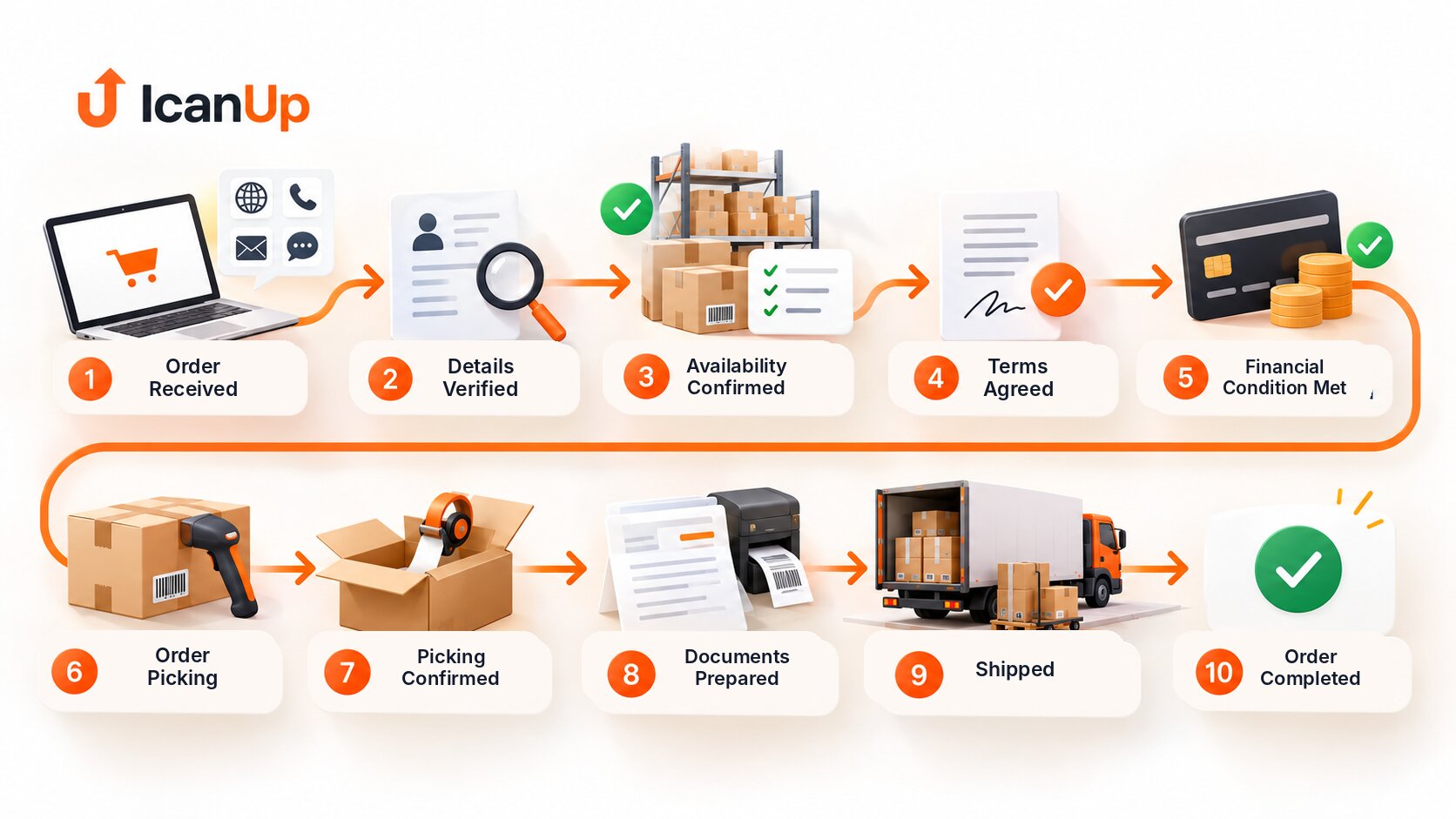
How I Would Design the Main Order Flow
The exact status names can differ between businesses. What matters more is that every stage has a clear meaning.
Order Received
The system records the request and initial data. The order should no longer exist only in a chat or in a manager’s notes.
Data Verified
Contacts, items, quantity, price, delivery, and other required terms are sufficient for the next step.
Availability Confirmed
It is clear what can ship now, what needs reservation, and where purchasing or waiting is required.
Terms Confirmed
The customer and company share the same understanding of price, quantity, timing, delivery, and payment.
Financial Condition Met
If prepayment or another financial condition is required, it is confirmed before the next critical step.
Sent for Picking
The warehouse receives a clear task with current products and quantities instead of a message hidden somewhere in a chat.
Picking Confirmed
The quantity actually prepared is verified. Any shortage becomes visible before shipment.
Documents Prepared
Required documents are produced from the same order data instead of being entered again in each separate place.
Shipped
The actual transfer of goods, date, quantity, and responsible operation are recorded.
Order Completed
The company has a clear final state while the history of important changes remains available.
| Stage | Who Acts | What Moves It Forward |
|---|---|---|
| Received | Sales or automated channel | Enough data exists for verification |
| Verification | Sales | Order terms are confirmed |
| Availability | System / warehouse / sales | Product is available or another scenario is selected |
| Payment | Finance / system | Required financial condition is met |
| Picking | Warehouse | Actual quantity is prepared |
| Documents | System / responsible role | Documents are ready |
| Shipment | Warehouse / logistics | Actual handoff is confirmed |
The simplest scenario is rarely the most interesting one.
Before development, it is much more useful to ask: what happens if stock is insufficient? If the customer changes quantity after confirmation? If only part of the payment arrives? If one item can ship now and another next week? If the warehouse discovers a discrepancy during picking?
I would not try to hide these situations inside free-form order comments.
If an exception happens repeatedly, it is already part of the business process and deserves a clear workflow.
At that point, management does not need to inspect every order.
It is more useful to see exceptions: orders without confirmed availability, overdue payment, picking that takes unusually long, partially shipped orders, or orders that moved back to an earlier stage.
A good system therefore does more than store a status. It helps answer the question: where is human attention needed right now?
A Few Questions About the Order-to-Shipment Process
Every company has its own workflow, but several principles appear very often.
Does every business need all of these statuses?
Should the system reserve stock automatically?
What about partial shipment?
Should payment be linked to the order?
What if a manager is allowed to make an exception?
Where should automation begin?
How I Would Design This Business Process
In this series, I take one real business process and break it down step by step: which data is needed, who makes decisions, where exceptions appear, and what repetitive manual work could be removed.

Does a Process Depend on Spreadsheets, Chats, and People’s Memory?
It does not necessarily need to be replaced with a large system immediately. The first step can be to break the workflow down: where work starts, who makes decisions, where data is duplicated, and which operations create the most unnecessary work.