Why I decided to upgrade to PHP 8.5
I had previously faced a situation where a server provider did not offer even PHP 8.4, explaining that the version was not stable enough yet.
However, the availability of a version in a hosting control panel and the official PHP release status are two different things. A provider may need more time to test its own images, extensions, control panel, or server upgrade process. That does not make an officially stable PHP release unstable.
When a hosting provider does not yet offer a new PHP version, this may be a limitation of its infrastructure rather than a problem with PHP itself.
PHP 8.5 became stable on November 20, 2025. At the time of my upgrade, it was no longer a preview or release candidate, but a supported stable branch that had already received several patch releases.
I use my own VPS, so later I will be able to install the required PHP version and manage PHP-FPM myself. However, the server upgrade will be a separate stage.
First, I decided to prepare the local environment and verify my own Laravel package. This makes it possible to find problems before making any server changes.
What I upgraded
During this stage, I:
installed PHP 8.5 locally;
updated Composer;
updated Laradock;
kept PHP 8.3 as the primary version;
added separate containers for PHP 8.4 and PHP 8.5;
restored local extra hosts;
updated the Xdebug configuration;
verified Nginx upstreams for different PHP versions;
raised the minimum version of my Laravel package from PHP 8.4 to PHP 8.5;
ran the complete automated verification suite.
Installing PHP 8.5 locally
PHP 8.4 was already the primary CLI version on my Ubuntu system, while PHP 8.5 packages were available through the configured repository.
I installed PHP 8.5 together with the extensions required by Composer, Laravel, and the test suite without removing the previous PHP versions.
sudo apt install \ php8.5-cli \ php8.5-common \ php8.5-curl \ php8.5-mbstring \ php8.5-xml \ php8.5-zip \ php8.5-intlAt first, PHP 8.5 remained available through the separate php8.5 command. After verifying it, I switched the system CLI version through update-alternatives.
sudo update-alternatives --config php php -vPHP 8.5.9 (cli)Updating Composer
Composer was installed globally and worked with both PHP 8.4 and PHP 8.5, but the Composer version itself was outdated. I updated it to the current stable version before changing the package requirements.
sudo -H php8.5 "$(command -v composer)" self-update --stable composer --versionComposer version 2.10.2PHP version 8.5.9Multiple PHP versions in Laradock
Before the upgrade, the primary Laradock environment used PHP 8.3. I had previously added a separate PHP-FPM service for PHP 8.4 manually.
I did not want to change the primary version for every project. Some applications still use PHP 8.3, others use PHP 8.4, while the new package should run on PHP 8.5.
I therefore updated Laradock to a newer version with support for parallel PHP services and configured three independent environments.
I later turned this setup into a local multi-PHP workflow with dphp, dartisan, and dcomposer, where the correct workspace is selected automatically for each project.
php-fpm → PHP 8.3workspace → PHP 8.3 php-fpm-84 → PHP 8.4workspace-84 → PHP 8.4 php-fpm-85 → PHP 8.5workspace-85 → PHP 8.5Multi-PHP overlay
The primary version remained configured in the Laradock .env file:
PHP_VERSION=8.3COMPOSE_FILE=docker-compose.yml:docker-compose.multi-php.yml:docker-compose.local.ymlAn additional Compose file defines separate workspace and PHP-FPM services for PHP 8.4 and PHP 8.5. They inherit the main Laradock configuration but are built with a different PHP version.
services: php-fpm-85: extends: file: ../php-fpm/compose.yml service: php-fpm build: context: ../php-fpm args: - LARADOCK_PHP_VERSION=8.5 workspace-85: extends: file: ../workspace/compose.yml service: workspace build: context: ../workspacePreserving the local configuration
Updating Laradock was not enough. The previous configuration already contained local domains, Nginx sites, Xdebug settings, and custom MySQL changes.
I did not copy every old file over the new version. Instead, I compared the changes, kept the current upstream configuration, and moved my own settings into a separate local Compose overlay.
Extra hosts for all PHP containers
My local projects use .test domains. They must resolve not only inside the primary workspace, but also in PHP 8.4, PHP 8.5, PHP-FPM, and Nginx.
For that reason, the same extra_hosts list was added to all required services through docker-compose.local.yml.
services: workspace: extra_hosts: *local-extra-hosts workspace-84: extra_hosts: *local-extra-hosts workspace-85: extra_hosts: *local-extra-hosts php-fpm: extra_hosts: *local-extra-hosts php-fpm-84: extra_hosts: *local-extra-hosts The checks inside the containers confirmed that the local domain was available from both PHP 8.4 and PHP 8.5.
docker compose run --rm workspace-84 sh -lc \ 'php -v | head -n 1 && getent hosts icanup.test' docker compose run --rm workspace-85 sh -lc \ 'php -v | head -n 1 && getent hosts icanup.test'PHP 8.4.24172.17.0.1 icanup.test PHP 8.5.9172.17.0.1 icanup.testNginx and PHP-FPM upstreams
After the services were renamed, the existing Nginx configurations still referenced php-fpm-8.4. I updated them to use the new php-fpm-84 service name.
The primary upstream remained on PHP 8.3, while projects running PHP 8.4 use the separate service.
fastcgi_pass php-fpm:9000;fastcgi_pass php-fpm-84:9000;The PHP 8.5 service is already prepared, but a specific project will be moved to it only after the application itself has been upgraded and verified.
Updating Xdebug
While migrating the configuration, I noticed that the newer file contained old Xdebug 2 settings. I kept the current Xdebug 3 configuration with port 9003 and trigger-based startup.
xdebug.mode=debugxdebug.start_with_request=trigger xdebug.client_host=host.docker.internalxdebug.client_port=9003xdebug.discover_client_host=0 xdebug.idekey=PHPSTORMUpgrading the Laravel package baseline
After preparing the environment, I returned to my own Laravel localization package.
The package does not yet have a stable public release. This is therefore a better time to raise the minimum PHP version than after other projects start depending on an already published contract.
"require": { "php": "^8.4"}"require": { "php": "^8.5"}The ^8.4 requirement already allowed the package to run on PHP 8.5. Changing it to ^8.5 means something different: PHP 8.5 is now the minimum officially supported version of the package.
Together with composer.json, I updated:
README with the current requirements;
CHANGELOG with the new minimum baseline;
the local development environment;
Composer platform verification.
Did the code need changes?
No. First, I ran the package on PHP 8.5 without changing composer.json. This was a control check of the package's actual compatibility.
After the successful result, I raised the minimum requirement to ^8.5 and ran all checks again.
composer validate --strictcomposer check-platform-reqscomposer checkPHP 8.5.9Composer 2.10.2Laravel Pint PASSPHPStan No errorsPHPUnit 116 tests, 189 assertionsThis does not mean that every PHP project can be upgraded by changing only the version constraint.
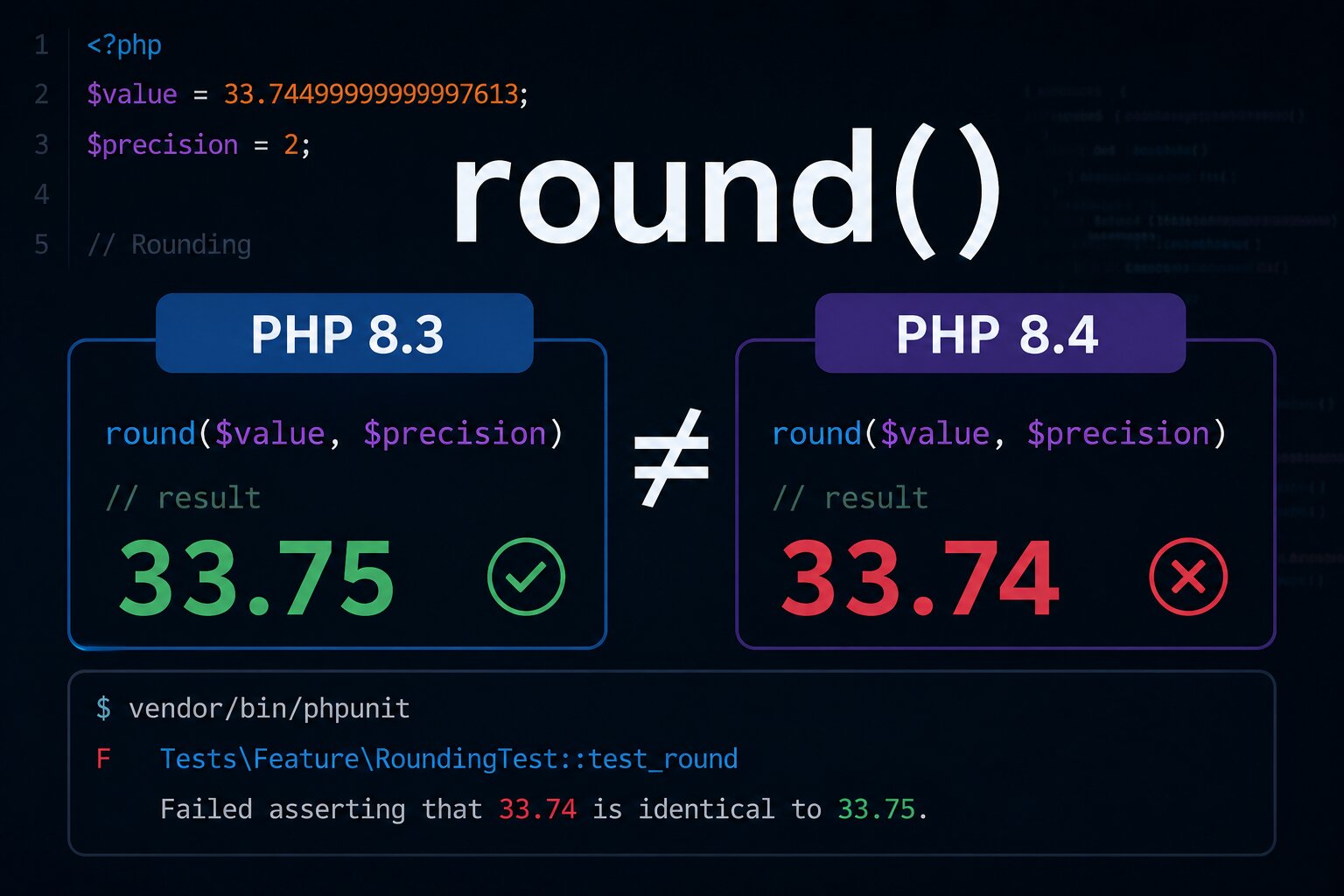
I had already seen how changing the PHP version alone can affect application behavior: in another case, the same test produced a different round() result on PHP 8.3 and PHP 8.4.
The official PHP documentation recommends reviewing backward-incompatible changes and deprecated features before upgrading. In my case, the test coverage showed that the package did not use problematic constructs and preserved its current behavior.
The final result
After the upgrade:
the system PHP CLI runs on PHP 8.5;
Composer runs through PHP 8.5;
primary Laradock projects can remain on PHP 8.3;
separate projects can continue using PHP 8.4;
PHP 8.5 is available as a separate workspace and PHP-FPM service;
local domains are available in all required containers;
Nginx can resolve all three PHP-FPM services;
my Laravel package requires PHP 8.5;
the complete test suite passes without code changes.
A runtime upgrade does not always mean rewriting the application. Often, the main work is preparing the environment, preserving compatibility for other projects, and confirming the result with tests.
Conclusion
I did not move to PHP 8.5 on the day it was released. At the same time, I did not want to wait until every hosting provider or prepared server image added it to its control panel.
For me, the right moment came when three conditions aligned: PHP 8.5 was a stable supported version, my package was still before its first public release, and I could verify everything locally without affecting the other projects.
As a result, PHP 8.5 became the new package baseline, while Laradock can now run PHP 8.3, PHP 8.4, and PHP 8.5 side by side.
The next separate stage will be upgrading the Laravel application itself and installing PHP 8.5 on the VPS. I will move to the server only after the local environment and application are fully prepared and verified.