When the ICanUp Media Library started serving more than one part of the application, the simple model of "upload a file and store its ID" stopped being enough.
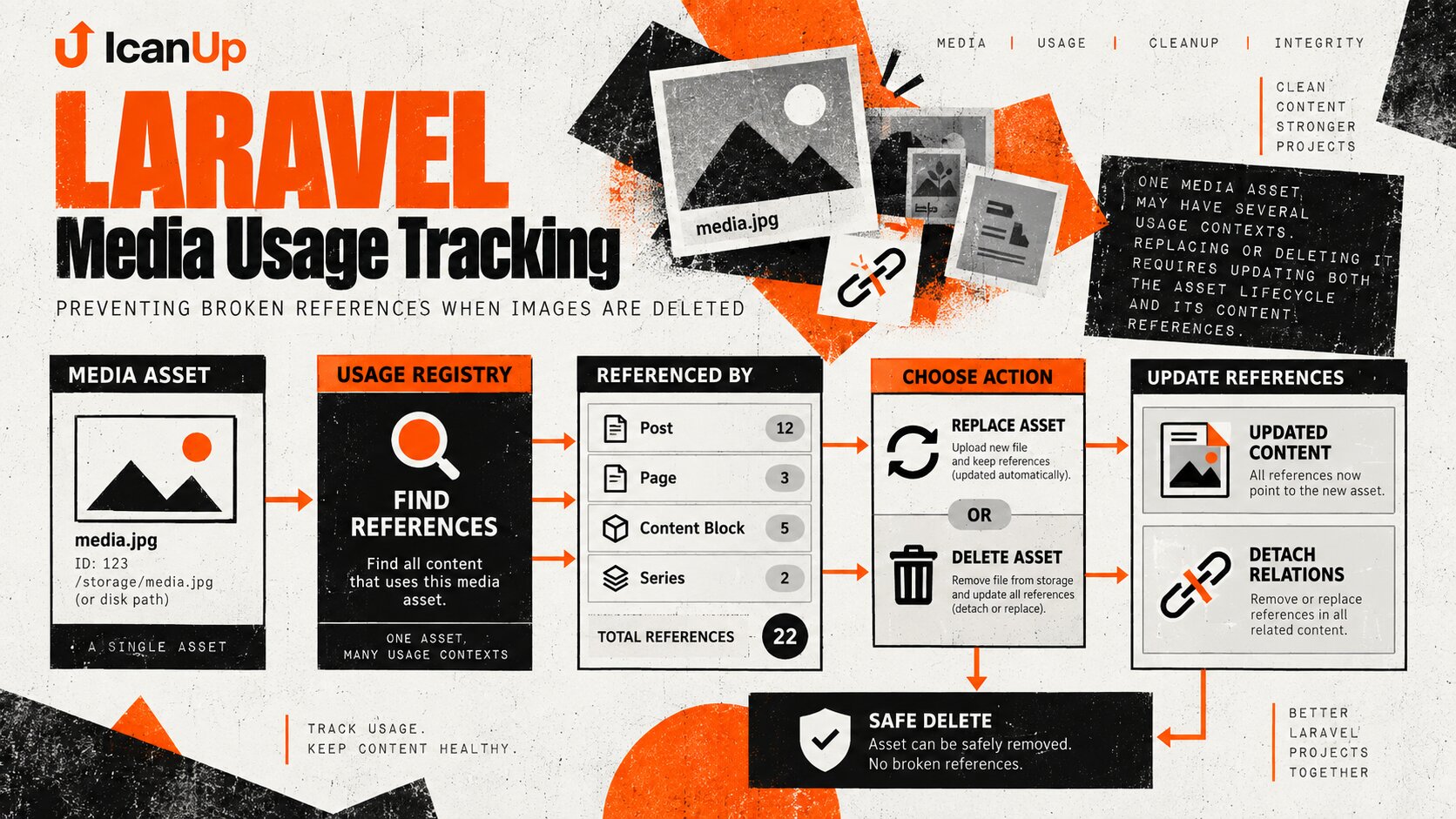
One image may become a Post cover, News cover, or Post Series cover. Another may be used inside content. Later, an administrator may replace or delete it.
At that point, the important question is no longer only about the file itself: does the system know where the asset is being used and what happens to those references when it is deleted?
The Simplest Implementation Works Until the First Delete
A cover image can begin with a simple nullable foreign key:
$post->image_media_id = $media->id;$post->save();That may be sufficient while Media is never replaced or deleted.
Once the application has a real media library, however, the asset gains a lifecycle:
upload | vselect | vuse in content | +-- replace | +-- soft delete | +-- permanent deletemedia_id Does Not Tell Me Where the Asset Is Used
The Media table tells me that an asset exists.
It does not by itself tell me whether the asset is currently used as:
- a Post cover;
- a News cover;
- a Post Series cover;
- a Content Block image;
- another supported usage context.
That is why the system needs a separate concept of Media usage.
I Separate the Media Asset from Its Usage
Media | +-- Post / IMAGE | +-- News / IMAGE | +-- PostSeries / IMAGE | +-- ContentBlock / IMAGEMedia describes the asset itself.
Usage describes the fact that a particular entity uses that asset in a particular context.
Those are different responsibilities, and separating them makes replacement and deletion predictable.
I Do Not Trust the Media ID Submitted by the Form
The Media Picker can display images only and hide deleted assets. That is good UX, not a server-side guarantee.
A request can be modified manually, so the backend validates Media again.
$media = Media::query() ->findOrFail($mediaId); if (! $media->isImage()) { throw ValidationException::withMessages([ 'image_media_id' => 'Selected media must be an image.', ]);}Replacing an Image Changes Two References
When a cover changes from Media A to Media B, storing the new foreign key is only part of the operation.
For usage tracking, two things happen:
Before: Post | +--> Media A After: Post | +--> Media B Media A usage: removeMedia B usage: addIf only image_media_id is changed while the old usage remains, Media A will appear to be used forever even though the Post no longer depends on it.
That Is Why I Synchronize Usage Instead of Only Adding It
In ICanUp, a dedicated Media usage service owns this responsibility.
Conceptually, the call looks like this:
$changedMediaIds = $mediaUsageService ->syncSingleForContext( $post, $oldMediaId, $newMediaId, MediaUsageContextEnum::IMAGE, );The important word for me is sync.
The service receives the previous and next state and can make usage reflect the entity's real reference.
A Shared Service Keeps Media Rules Out of Every Module
Without a shared layer, every module would start solving the same problems independently:
- how to register new usage;
- how to remove old usage;
- how to define the context;
- how to update Media state after references change;
- how deletion should behave.
Post, News, and Post Series would quickly end up with different rules.
I want content modules to describe what changed, while the Media layer handles usage consistently.
Usage Tracking Is Useful for More Than Deletion
Task | Why usage matters |
|---|---|
Delete Media | Know which entities may be affected |
Replace Media | Remove the old usage and create the new one |
Admin UI | Show whether the asset is currently used |
Audit | Find exactly where an asset is referenced |
Cleanup | Avoid deleting a needed file as supposedly unused |
Soft Delete and Permanent Delete Mean Different Things
I treat temporary removal and permanent deletion as different operations.
A soft-deleted Media asset can become unavailable for new selections while the record still exists and the system can retain its history and usage information.
Permanent deletion is stronger: active references to that Media ID must not be left behind.
Permanent Delete Must Not Leave a Dangling Foreign Key
The worst result looks like this:
news.image_media_id = 123 media.id = 123 | X permanently deleted Result:News still points to media 123,but media 123 no longer exists.Permanent deletion therefore needs to account for known references.
For a nullable cover relationship, clearing the reference before or as part of deletion can be the safe result.
$news->image_media_id = null;$news->save();A Foreign Key Helps but Does Not Describe All Media Usage
A database foreign key is extremely useful for a direct field such as image_media_id.
A nullable FK with an appropriate deletion rule can prevent some broken references automatically.
A complete Media Library usually has more usage patterns than one column in one table, however.
- direct foreign keys;
- images inside Content Blocks;
- multiple Media assets in one context;
- polymorphic references;
- future modules that also consume Media.
Database constraints and usage tracking therefore complement each other instead of replacing each other.
Deleting the File and Deleting the Media Record Are Different Operations
There is another layer: the physical file in storage.
If the file is removed first and reference cleanup later fails, the database can retain a Media record whose file no longer exists.
The permanent-deletion workflow therefore needs an explicit order just like database changes do.
1. Resolve usages2. Apply deletion policy3. Clean references4. Remove Media record5. Remove physical file at the safe pointAfter-Commit Events Are Useful for Derived Media State
After usage changes, other parts of the system may need to refresh derived state or cached information.
I do not want to announce a successful change before the database transaction has actually committed.
DB::afterCommit( static function () use ( $mediaUsageDispatcher, $changedMediaIds, ): void { $mediaUsageDispatcher->dispatch( array_values( array_unique($changedMediaIds) ) ); });This reduces the risk of external reactions occurring while the transaction itself later rolls back.
The Media Picker and the Server Have Different Responsibilities
Media Picker | Laravel backend |
|---|---|
Shows a convenient asset list | Verifies the Media actually exists |
Filters asset types | Validates the allowed type |
Hides deleted assets | Rejects deleted Media |
Helps the user select a file | Protects the domain contract |
The UI can make the correct choice easier. The server must make the incorrect choice impossible.
I Want to Know About Usage Before Delete Is Pressed
Usage tracking is valuable before a destructive operation happens.
If an asset is used in several places, the admin interface can expose those dependencies before permanent deletion.
Media: architecture-cover.png Used by:- Post cover- News cover- Post Series coverDeletion is no longer a blind action.
The administrator can see that the resource has dependencies while the backend remains the final safety boundary.
Unused Media Also Needs a Reliable Definition
Over time, a Media Library collects assets that are genuinely no longer referenced.
Deleting them because "no Post points to this Media" is unsafe.
The asset may still be used by News, a series, or another content type.
A usage layer makes "unused" a system-wide concept instead of a module-specific guess.
Tests Need to Cover the Whole Lifecycle
Scenario | Expected result |
|---|---|
Valid image Media selected | Reference and usage are created |
Media does not exist | Request is rejected |
Media is deleted | New usage is rejected |
Media is not an image | Image context rejects it |
Cover is replaced | Old usage is removed and new usage is created |
Cover is cleared | Old Media usage is removed |
Permanent delete | No active broken reference remains |
The same Media is used by multiple entities | Removing one usage does not remove the others |
One Media Asset Can Have More Than One Usage
This distinction matters.
If one image is used by two pieces of content, replacing the first cover does not make the asset unused.
Media 75 | +-- Post 18 / IMAGE | +-- News 4 / IMAGE Remove Post 18 usage | v Media 75 is still used by News 4What I Do Not Do with Media References
- Do not trust a Media ID only because the Media Picker submitted it.
- Do not allow deleted Media to be used in new content.
- Do not allow the wrong Media type to be used as an image.
- Do not add a new usage without removing the previous one during replacement.
- Do not classify Media as unused after checking only one module.
- Do not remove the physical file without considering the record and its dependencies.
- Do not leave permanent deletion without an explicit reference policy.
- Do not rely on the client interface alone for Media Library integrity.
My Short Media Usage Checklist
- Separate the Media asset from the fact that it is being used.
- Define supported usage contexts.
- Validate Media existence on the server.
- Validate the Media type for the requested context.
- Reject new usage of deleted Media.
- Synchronize old and new usage during replacement.
- Handle clearing nullable Media fields correctly.
- Treat soft delete and permanent delete as different operations.
- Resolve all known usages before permanent deletion.
- Do not leave dangling foreign keys or other broken references.
- Do not classify an asset as unused until the complete Media Usage layer has been checked.
- Cover replacement, deletion, and multiple usages with automated tests.
Conclusion
The ICanUp Media Library stopped being only a file store once the same Media assets became reusable across different kinds of content.
Storing a media_id is easy. The harder part is knowing who currently depends on that Media, how to change the relationship safely during replacement, and what must happen during deletion.
I therefore separate the Media asset from its usage, validate selected Media again on the server, and synchronize previous and new references through a shared service.
Soft deletion and permanent deletion have different consequences, and a permanent delete must not leave active references to a resource that no longer exists.
For me, a reliable Media Library does not begin with upload. It begins with answering two questions: where is this file used, and what happens to every one of those places if the file is replaced or deleted?