In a public ICanUp form, Laravel server-side validation was working correctly, but the error message was wrong for the user.
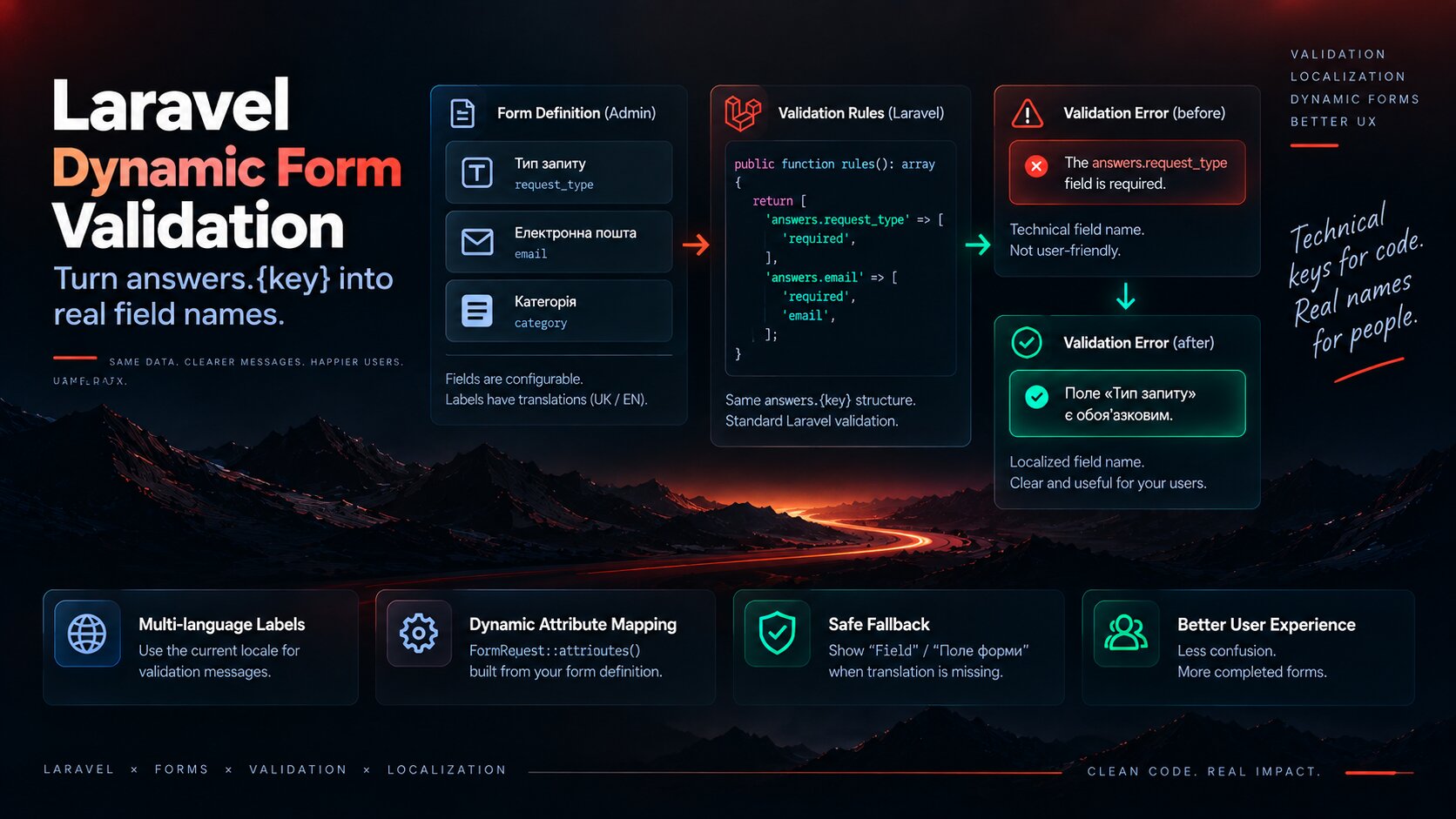
Instead of a real field name, the response could expose a technical path such as answers.request_type.
That key is useful to application code. It means nothing to a person filling in the form.
I wanted to keep the request structure and Laravel validation rules unchanged while teaching the validator to use the real localized label of the dynamic field.
The Problem Appeared Only in Server-Side Validation
A form could contain a field with this key:
request_typeThe public request naturally submitted it as a nested value:
{ "answers": { "request_type": null }}The Laravel rule therefore worked with the full attribute path:
'answers.request_type' => [ 'required',],Without extra display-name information, Laravel used the technical attribute path when formatting the error message.
validation.php Cannot Solve a Dynamic Attribute Name by Itself
It is easy to assume that the fix belongs entirely in lang/en/validation.php or another locale file.
But the message template and the field display name are separate concerns.
Part | Example |
|---|---|
Message template |
|
Technical attribute |
|
User-facing label |
|
Laravel can translate the whole validation sentence correctly and still produce a poor result if :attribute remains technical.
I Did Not Want to Change answers.{key}
The answers.{field_key} structure was already the correct application contract.
It creates a stable link between a form field definition and the submitted answer regardless of the language used for the label.
For example, request_type can have different translations:
Locale | Label | Key |
|---|---|---|
UK | Тип запиту |
|
EN | Request type |
|
The technical key should not change with translations. Only the way that key is presented in validation messages needs to change.
FormRequest::attributes() Was the Right Extension Point
Laravel FormRequest already provides a mechanism for custom attribute display names through attributes().
That is the mechanism I use in the public form request.
The idea is simple: map each technical answer path to the localized field label.
public function attributes(): array{ return [ 'answers.request_type' => 'Request type', 'answers.email' => 'Email', ];}That would be enough for a static form.
My forms are reusable, however, so the field list is not known in advance.
Attribute Names Need to Be Built from the Form Definition
The rules and labels already exist in the form definition, so duplicating them in the FormRequest would create another source of truth.
Conceptually, the implementation looks like this:
public function attributes(): array{ $locale = app()->getLocale(); $attributes = []; foreach ($this->formFields() as $field) { $attributes["answers.{$field->key}"] = $this->localizedFieldLabel( $field, $locale, ); } return $attributes;}The Current Locale Determines the Field Label
The same public form can be opened in Ukrainian or English.
The validation message therefore needs to use the same language the visitor is currently using.
UK requestanswers.request_type ->Тип запиту EN requestanswers.request_type ->Request typeI do not want a Ukrainian validation sentence containing an English field label or the opposite.
The label is resolved through the existing form translation architecture for the active request locale.
The Fallback Must Not Expose answers.* Either
There is another important edge case: the field exists, but its label for the current locale is missing or malformed.
Even then, I do not want to expose:
answers.request_typeA neutral human-readable fallback is safer.
Locale | Fallback |
|---|---|
UK | Поле форми |
EN | Field |
$label = $this->localizedFieldLabel( $field, $locale,); return filled($label) ? $label : __('forms.field');attributes() Does Not Change the Validation Rules
This is one reason I prefer this solution.
attributes() does not change the payload or weaken any validation rule. It only controls the display name inserted into a validation message.
$rules["answers.{$field->key}"] = [ 'required', 'email', 'max:255',]; $attributes["answers.{$field->key}"] = $localizedLabel;Laravel still validates answers.email. The visitor simply sees Email.
One Attribute Name Works Across Different Validation Rules
Once Laravel knows the correct display name, it does not need a separate label for every rule.
Rule | Result |
|---|---|
| The “Email” field is required. |
| The “Email” field must contain a valid email address. |
| The same localized field name is reused. |
| The same localized field name is reused. |
Options / select | The dynamic field label is used instead of answers.* |
Checkbox | The validation message uses the FormField label. |
Hardcoding Individual Field Names Would Defeat Reusable Forms
With reusable Forms, an administrator can create a new field without a PHP deployment.
If I maintained every display name manually:
return [ 'answers.request_type' => 'Request type', 'answers.email' => 'Email', 'answers.company' => 'Company',];then every new form field would require an application change.
That would undermine the purpose of the form builder.
The Validation Label Should Come from the Same FormField as the UI
I want the label displayed in the form and the label inserted into the validation message to come from the same source.
FormField translation | +-- public form label | +-- validation attribute nameRenaming a field in the admin interface then automatically changes its validation message too.
No separate synchronization is required.
Client-Side Validation Does Not Replace Server Validation
Even if Vue already shows required errors or validates an email before submission, the server cannot use that as the source of truth.
Client validation can be bypassed and the request can be sent directly.
The Form definition therefore continues to generate authoritative Laravel validation rules, while client validation improves only the user experience.
attributes() Must Not Make Unexpected Fields Valid
A human-readable attribute name should not change the form security contract.
If a visitor submits a field that does not exist in the active Form definition, wrapping it inside answers must not make it accepted automatically.
{ "answers": { "request_type": "support", "unexpected_admin_field": "1" }}The allowed keys and validation rules still need to come from the current Form definition.
I Tested More Than One required Case
This kind of bug can be fixed for one example while other field types continue exposing technical attribute names.
The regression coverage therefore spans different rules and dynamic field types.
Scenario | What is verified |
|---|---|
UK required | Ukrainian field label |
EN required | English field label |
The same localized attribute name | |
min / max | The message does not fall back to answers.* |
select / options | Dynamic field label remains human-readable |
checkbox | The error uses the FormField label |
Missing translation | A safe fallback instead of a technical key |
A Test Should Verify More Than HTTP 422
An HTTP 422 Unprocessable Entity response proves that validation failed. It does not prove that the user received a good message.
I also want to verify the expected validation key and ensure that the old technical message is absent.
$response->assertUnprocessable(); $response->assertJsonValidationErrors([ 'answers.request_type',]); $response->assertJsonMissing([ 'The answers.request type field is required.',]);The Error Key and the Error Message Serve Different Consumers
I did not try to rename the validation key answers.request_type itself.
The frontend benefits from that stable path because it can attach the error to the correct field.
The message is the part that needs to be human-readable.
Error part | Consumer |
|---|---|
| Vue / application code |
“Request type” | The user |
What I Do Not Do After This Kind of Bug
- Do not rename
answers.{key}depending on the locale. - Do not hardcode every FormField label in the FormRequest.
- Do not create a parallel validation-message system only for Forms.
- Do not replace server validation with client validation.
- Do not expose raw
answers.*as a fallback label. - Do not use a label from the wrong locale when the current translation is missing.
- Do not change validation rules just to improve the error text.
- Do not treat HTTP 422 alone as proof of good validation UX.
My Short Checklist for Dynamic Form Validation
- Keep a stable technical field key.
- Build server rules from the Form definition.
- Build
attributes()from the same FormFields. - Use the label for the active locale.
- Provide a human-readable fallback when a translation is missing.
- Never expose raw
answers.*in user-facing text. - Test required, email, min, max, and option fields.
- Test UK and EN separately.
- Keep the validation key stable for client-side code.
- Do not change persistence or Communication integration only to localize validation messages.
The technical key belongs to the application. The field label belongs to the user. Laravel lets both remain correct without mixing their responsibilities.
Conclusion
In the ICanUp Forms case, server-side validation was not wrong. It simply knew the field as the technical path answers.{key} and did not know what that field was called for a person.
Translating standard Laravel validation messages solves only part of the problem. Dynamic forms also need localized attribute display names.
FormRequest::attributes() let me keep the request structure, validation rules, and validation bag unchanged while resolving the real FormField label for the active locale.
When a translation is missing, the user receives a neutral Field label instead of an internal path such as answers.request_type.
For me, proper validation localization means more than translating the word required. It means that a user should never need to understand the application’s internal data structure.